


I was scrolling down on X/Twitter when I noticed the following Python related post with 2.5k likes on it.
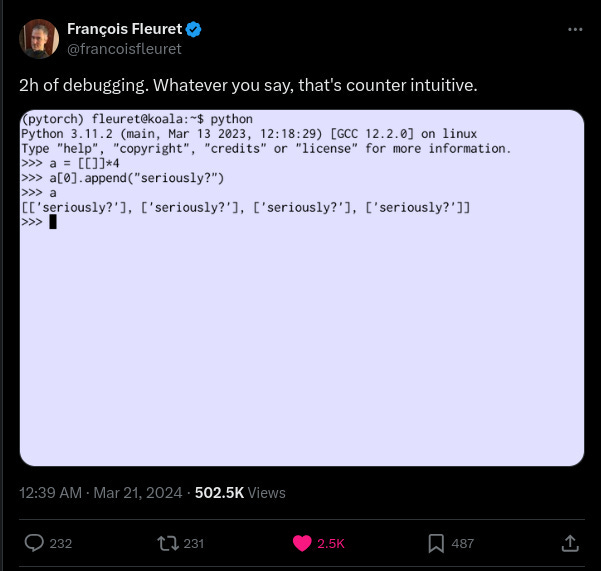
At first glance it does appear to be a surprising output and I agree with the sentiment that it is counter intuitive. I am not going to debate whether this is the right behavior or not. Instead, I want to take this opportunity to explain the reason behind this behavior and show some CPython internal details as part of the process.
We will start by a high level answer by just doing some inspection in the REPL, then we will go one level deeper and see the details of the list implementation in CPython to see why that happens, and finally we will go another level down to see how CPython invokes this behavior.
The Short Answer
This peculiar behavior of Python can be explained right from the REPL itself. So first, let’s get the short answer first using the REPL.
In Python, the * operator when used on a sequence type object (such as lists, strings), repeats the elements of the object x number of times. For instance: ‘a’ * 3 would produce ‘aaa’. Similarly, [[]] * 4 produces [[], [], [], []].
However, as you might know, everything is an object in Python and every object is accessed by a reference to it. So in [[]], the inner list is a reference to an empty list object. And the * operator is simply copying the same reference four times, resulting in [[], [], [], []]. And, all these repeated inner lists are references to the same initial empty list object.
We can verify this theory by printing the ids of each of the empty list as shown below:
>>> l = [[]] * 4
>>> l
[[], [], [], []]
>>> [id(x) for x in l]
[140035530892992, 140035530892992, 140035530892992, 140035530892992]
As you can see, each of the inner lists has the same object id, which means that they are references to the same object. This is why modifying one of these inner lists reflects as an update to every other list.

So this was the short answer. Now, for those interested in the CPython implementation details behind this, let’s dive in!
Understanding List Object Structure in CPython
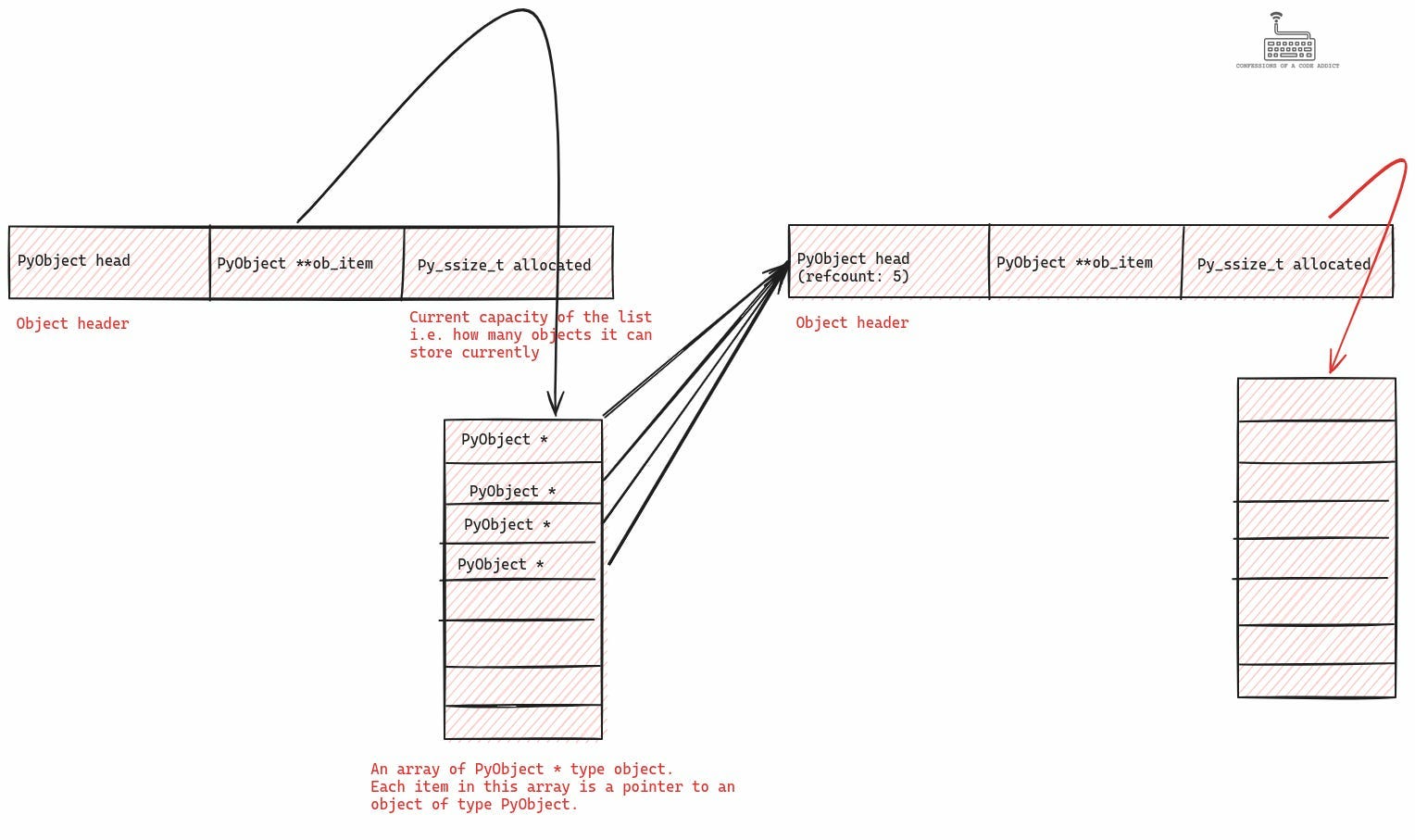
Let’s start by looking at the definition of the list object which is defined in the file Include/cpython/listobject.h. The following illustration shows its structure.

It consists of three fields:
The first field is an instance of the
PyObjectstruct (also called as the object header because it is the first field of every CPython object) — it contains the object reference count and type implementation related details about the object. (Watch my video on PyObject and PyTypeObject for more details).The third field is the current capacity of the list, i.e., how many objects can it hold. The list gets resized when it is about to overflow its capacity.
The 2nd field is an array of
PyObject *types. This array is where the list internally stores all those objects. Let’s discuss it in more detail.
Internal Object Storage Mechanism in CPython's List
So we know that the list type internally uses an array for storing its items. This data type of this array is PyObject *, which means that every item in this array is a pointer to a PyObect object. This itself means that the list simply stores references to objects instead of storing the actual objects. The following illustration shows how it looks like:

Let’s see what the list looks like after adding an element to it.
l = []
l.append(3.14)
As you can see in the illustration — when we add a new element to the list, internally the list is only storing a pointer (or reference) to that object. Now, let’s see how the list object in CPython handles the * operator and what happens to this array in that case.
Implementation of the Asterisk (*) Operator in List Types
With this basic understanding of how the list type is defined in CPython, let’s take a look at the function where it implements handling for the * operator. The complete implementation of CPython’s list object is in the file Objects/listobject.c and the following illustration shows the function which handles the * operation.

This function starts by creating a new list, it then copies the references stored in the original list into the new list, and finally it repeats those references n times in the new list.
Although I've annotated the whole function with commentary, let’s spend some time on the meat of the function where the items of the first list are being copied and repeated into the new list. Let’s start by looking at how a list which stores an empty list as its only element looks like in memory:
l1 = []
l1.append([])
So this is the way things look like before we use the * operator. The outer list l1 contains another list as its first element. This is shown by having an entry in the ob_item array of l1 which points to the other list. This other list currently has a reference count of 1. We will see how this changes after we apply the * operator.
>>> l2 = l1 * 4
>>> print(l2)
[[], [], [], []]
Let’s see how things look like after applying the * operator on l1 as per the above code snippet.
The above illustration shows the result of doing l1 * 4. Note that the * operator on lists creates a new list by copying the references stored in the original list n times in the new list. As you can see, the ob_item array in this new list contains 4 pointers (or references) to the same empty list object. Also, the reference count of the list they are pointing to has gone up from one to five — four references from l2 and one reference is from l1.
Finally, what happens when we do l2[0].append()? The following illustration shows that
l2[0].append(3.14)
We appended the float value 3.14 to the first element of l2. The above figure illustrates the changes caused by that. The 4 elements in l2 still point to the same common list but now this list’s ob_item array contains a reference to a float type object with value 3.14.
This is everything that goes on when we use the * operator on lists. But there is one more question — how does the CPython runtime know that it needs to invoke this particular function when the * operator is used on a list type object? This is a bonus section unrelated to understanding our original question. You can continue to read if you are interested in going deeper in CPython internals.
How CPython's Virtual Machine Executes the Asterisk (*) Operator for Lists
So how does the CPython VM know that it needs to invoke the function list_repeat from inside listobject.c (we saw this function in the previous section)? Let’s learn this from the bottom up.
Setting Up the Header for List Objects in CPython
In the first section we saw the definition of the list object in CPython, and we saw that the first element in it was an instance of the PyObject struct. It turns out every type definition in CPython includes this as its first field and as a result this field is also called the object header (because it lies at the beginning of each object).
The PyObject struct includes the reference count of the object and it also includes a pointer to an object of type PyTypeObject. Now, PyTypeObject struct is of interest here because it includes fields for storing type related information about the object.

Among these fields are a bunch of function pointer tables for handling various operators and object protocols. Among these function pointer tables, there is a table called tp_as_sequence. It contains function pointers for handling operations which are expected by sequence type objects. These operations include things like slicing, indexing, repetition, concatenation, etc.
The following illustration shows a partial definition of the PyTypeObject struct (because it’s too big to show all of it here) and highlights a couple of function pointer tables, i.e. tp_as_number (for numeric operators) and tp_as_sequence (for handling sequence type operators).

Every object in CPython (depending on its type, i.e. whether its numeric, sequence type etc) needs to implement the relevant functions for handling various operations. For instance, a sequence type object needs to implement functions for handling indexing, slicing, repetition, etc and populate the tp_as_sequence field in its PyTypeObject instance with pointers to those functions. The following illustration shows how all of this happens inside listobject.c.
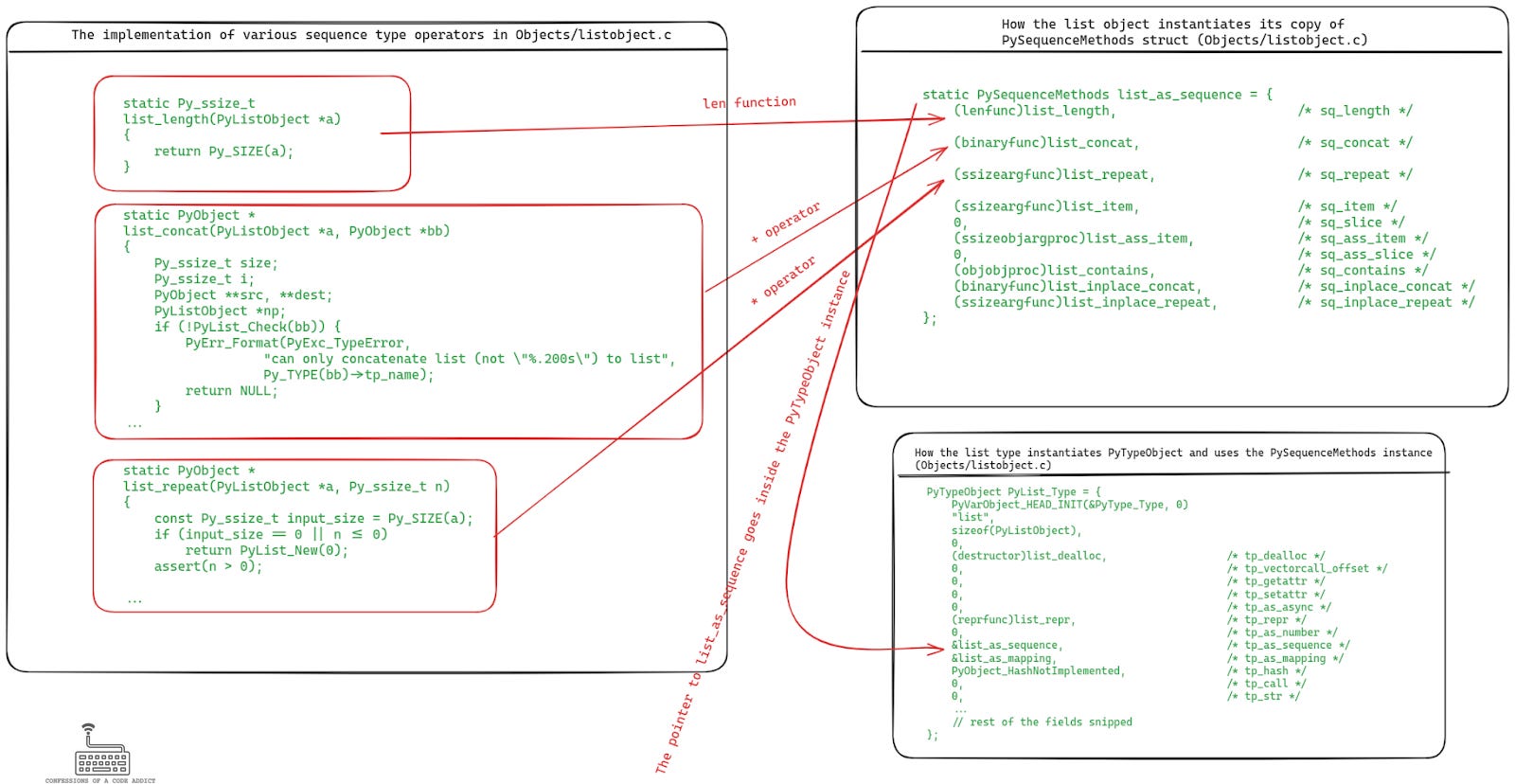
The illustration shows the functions that the list object implements for handling the len, + and * operations on lists. The pointers to these functions are used to populate an instance of the PySequenceMethods struct, and finally a pointer to this object goes inside the instance of the PyTypeObject (called PyList_Type).
Next, a pointer to this PyList_Type object is used to populate the header of every new list object upon initialization. The following illustration shows the code which is invoked every time the CPython runtime needs to create a new list object.

This means that every list object has these function pointers in its headers at runtime, which the VM can lookup to execute them to handle different operations. In fact, every CPython object follows a similar protocol in its implementation to populate the function pointer tables in their header. Now let’s see how the CPython VM looks up this header to perform various operations on the objects.
Function Pointer Table Lookup by CPython's VM
Let’s understand this with the help of an example where we have a function which performs the * operator on a list object.
>>> def repeat():
...     l = []
...     return l * 4
...
>>> dis.dis(repeat)
  1           0 RESUME                   0
  2           2 BUILD_LIST               0
              4 STORE_FAST               0 (l)
  3           6 LOAD_FAST                0 (l)
              8 LOAD_CONST               1 (4)
             10 BINARY_OP                5 (*)
             14 RETURN_VALUE
The above listing also shows the compiled bytecode for this function using the dis module. CPython uses a stack based virtual machine (VM) to execute these bytecode instructions. The VM uses a stack to store the arguments for executing these instructions.
Apart from the stack, there is a locals table for storing scope local variables and function arguments, and a globals table for storing global objects. Based on this information, let’s understand what is happening in this bytecode sequence.
BUILD_LIST: creates a new list object.STORE_FAST: puts the list object into the locals table (i.e. the variablel) at index 0LOAD_FAST: loads the object at index 0 from the locals table and pushes it onto the stackLOAD_CONST: pushes the constant 4 onto the stackBINARY_OP: pops the top two objects from the stack and performs the*operation on them, i.e., it pops 4 andlfrom the stack and executes the*operation on them. Let’s discuss this in more detail.
The implementation for handling all these bytecode instructions is present in the file Python/generated_cases.c.h. The code for handling the BINARY_OP instruction looks like the following:
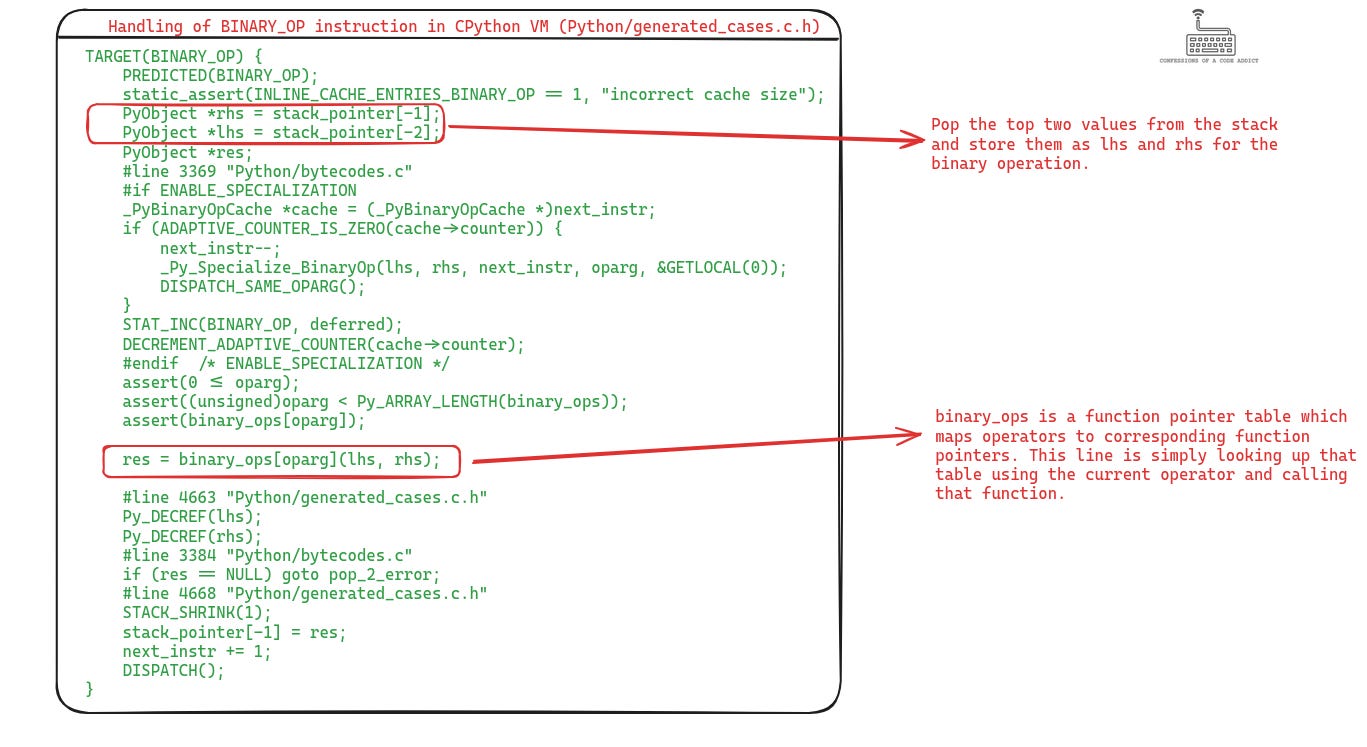
So we see that the VM has a function pointer table for handling each operator. In order to execute a binary operation, it looks up this table and calls the corresponding function. Now let’s see what this table looks like.
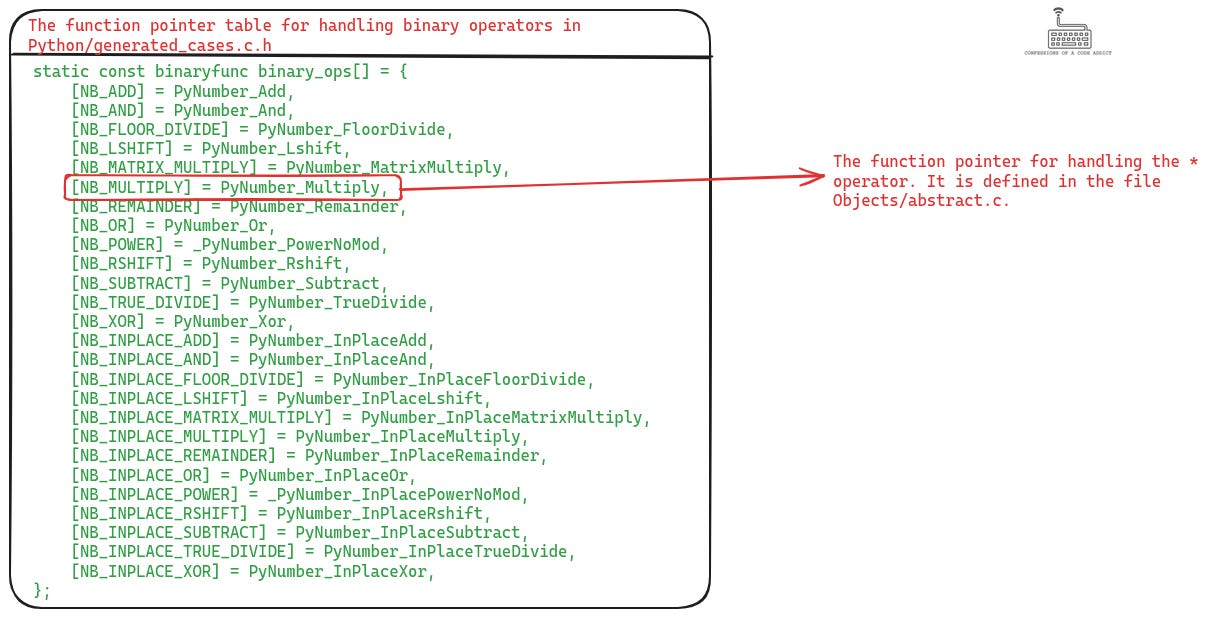
All the function pointers mapped in this table are defined in the file Objects/abstract.c. This abstract.c is an abstract object interface that hides the type system implementation details from the VM. The VM doesn’t need to know how the different types implement different operators, it lets the abstract object interface deal with that part. Now let’s take a look at the implementation of the PyNumber_Multiply function in Objects/abstract.c.

The above illustration lists the function from abstract.c which handles the * operator. As you can see, this function is fully aware of how the type system in CPython exposes the functions for handling the operators via the function pointer table in the object header.
Even though the function name is PyNumber_Multiply, it handles the * operator for both numeric types and sequence types. First it tries to look up the function pointer table for numeric operations (which is defined inside the PyNumberMethods field of PyTypeOjbect), and when that fails then it tries to lookup the function pointer table for sequence types. Once it finds the function, it invokes that function and returns the value.
Summary
So this was all we needed to know about the CPython implementation details behind the handling of * operation on sequence type objects and to understand the reason behind that peculiar behavior for which we started this whole exploration. Let’s summarize all of this discussion quickly to conclude this article:
Everything is an object in Python but those objects are accessed by references, i.e., our code is dealing with references to objects as opposed to the objects directly.
Lists also store references to other objects internally.
When the
*operator is applied on a list, a new list object is created which contains the references stored in the original list repeated n times. This means that the repeated elements in the new list are sharing references to the same object.We looked at how this is implemented within CPython’s list implementation.
We looked at the definition of the list object in CPython and learned that it internally uses an array to store the items. This array contains pointers to objects of type
PyObject.PyObjectis the universal type in the CPython runtime to represent all the objects.We saw when we store a value in a list, how it results in the array storing a pointer to that object.
We looked at the function in
listobject.cwhich handles the*operator and saw how this function simply copies these pointers in the new list. Which again shows how the repeated values in the new list are simply pointers to the same object.Then we went one level deeper and saw how the CPython VM invokes the right function in
listobject.cwhen the*operator is applied on a list type object.This is done by doing a function pointer lookup in a table present in the list object’s header.
The **ob_item gave away the double pointer play (pointer to the reference) and then as they say, the rest is history 😊. Great writing by the way!
For me this is not so much shocking.
Simply lists are stored by reference and if you copy that reference you are still pointing to the same memory area/object.
Maybe because I have a C++ background this doesn’t seem so surprising.
A similar thing happens when you want to have a default empty collection (like a list) in a function argument: if you pass ‘def fun(my_list=[])’, that list is a single one and not created every time you invoke the function (as intended most of the times).
The solution to this problem is to use ‘list()’ instead of ‘[]’