


This post is almost a book-level coverage of virtual memory. I have been working on it for the last couple of months.
Since this is a book-length deep dive, I have also prepared a beautifully typeset 60-page PDF/EPUB version for readers who want to read it offline, highlight it, or keep it as a reference. Buying the ebook is also a direct way to support the work that went into this piece.
Thanks for sticking around. Now let’s get into virtual memory.
Virtual memory is a fundamental component of modern computing that is essential to master for building and debugging high-performance data-intensive systems.
Normally, we think of virtual memory as a system that provides isolation at the memory level to processes, which means that the operating system (OS) can run multiple processes concurrently without those processes interfering or corrupting each other’s data in memory. But, virtual memory does so much more than that, such as:
lazy allocation of memory through demand paging
copy-on-write for shared memory between processes, and fast process creation via fork
file I/O that avoids the page-cache-to-user-buffer copy using mmap
page reclaim, swap, and the page cache
performance effects from access patterns, huge pages, TLB shootdowns, and NUMA placement.
This article is a broad, practical coverage of what virtual memory is, how it works, and how it affects performance of data-intensive systems. By the end of the article you will have a mental model and understanding of following key ideas:
Why virtual memory exists: Process isolation, memory protection, and the illusion of abundant memory.
The virtual address space: How a process’s memory is organized into segments (code, data, heap, stack, and memory-mapped regions).
Address translation: How virtual addresses are converted to physical addresses using hierarchical page tables, and why the page table hierarchy avoids wasting memory.
The role of hardware: How the MMU and TLB accelerate address translation, and why TLB hit rates matter for performance.
Demand paging: How the kernel delays physical memory allocation until pages are actually accessed, and how page faults drive this lazy allocation.
Memory types and reclaim: How anonymous, file-backed, shared, and tmpfs-backed pages differ, and why the kernel reclaims them differently.
Copy-on-write: How processes share memory efficiently and how fork creates new processes almost instantly.
Memory-mapped I/O: How
mmapmaps file data into a process address space, avoids an extra user-buffer copy, and enables shared memory between processes.Performance implications: How page size, TLB reach, and memory access patterns affect the performance of data-intensive workloads.
Observability: How to inspect VMAs, RSS/PSS, page faults, TLB behavior, and NUMA placement on Linux.
How to Read This Article
This article takes a different approach to teaching virtual memory. Instead of presenting a collection of facts and definitions, we explain concepts through a narrative: a series of dialogues between a newly created process named Alloca and the Kernel. Alloca encounters challenges as she executes her code, and the Kernel explains how things work in response to her questions. This dialogue-based format allows us to build understanding incrementally, introducing complexity gradually as natural questions arise.
Structure: Each section follows the same pattern: a dialogue that explores a concept in depth, followed by a Key Takeaway box that provides a formal summary, definitions, and technical details. If you prefer a quick overview, you can read just the Key Takeaway sections. If you want deep understanding, read the full dialogues.
Length and Pacing: This article is comprehensive, approximately 25,000 words covering everything from basic address translation to demand paging, page reclaim, copy-on-write, observability, and performance implications. Don’t feel obligated to read it in one sitting. Virtual memory is a complex topic with many interconnected pieces. Take your time, read it in multiple sessions, and let the concepts sink in. Each section builds on previous ones, so it’s designed to be read sequentially. Also, if you have taken a course in operating systems, the early parts of the article may seem a bit too basic to you. I encourage you to jump forward and directly read the parts that interest you, there is quite a lot of advanced content as well.
Implementation Details: Virtual memory concepts are largely universal across operating systems, but when we discuss specific implementation details, such as huge pages, TLB behavior, or page fault handling, those details are based on the Linux kernel and x86-64 architecture. Also, throughout the article we will talk about 4-level page tables that are still prevalently used in most kernels. Although, latest Linux kernel also supports 5-level page tables but it should be trivial to understand how that works if you master how 4-level page tables work.
Asides: While most of the article follows a narrative style of a dialogue between Alloca and the Kernel, there are certain additional details that I’ve sprinkled throughout the article in the form of asides.
Now, let’s meet Alloca and follow her journey through the virtual memory system.
The Need for Virtual Memory
As Alloca starts to execute her code, she encounters her first challenge. She needs to read some data from memory. The instruction contains the address of the data and Alloca thinks, “well, this shouldn’t be too difficult. I just need to go to this address and read the value”. But she is up for a huge surprise.
As she goes to that address, she finds that there is nothing there. It’s all just a facade. She stands there puzzled, wondering what she should do now. Then she sees a tall figure moving towards her from the shadows.
Alloca: “Who are you?”.
Kernel: “I’m the Kernel. I’m in charge of this entire world, I make sure that all processes do their job smoothly. What are you doing here? There is nothing at this place!”
Alloca: “I think I’m lost. I was supposed to read data from this address but it looks like it is all a facade, and I don’t know what to do now”.
Kernel (smiling): “I can understand the confusion. The address that you have is not a real address, it’s a virtual address.”
Alloca: “Virtual address? What does that mean?”
Kernel: “Well, what you think of memory is not the real physical memory, it is virtual memory. And, the address that you hold is a virtual address. What you need is the physical address to get the data from physical memory.”
Alloca: “What is virtual memory? Why not just give me direct access to physical memory?”
Kernel: “Let’s think about it from the first principles. I am responsible for the concurrent execution of not just you but hundreds of other process. You might not notice, but right now there are many other processes executing alongside you. If each one of you had direct access to physical memory, how would you coordinate who accesses which addresses in memory?”
Alloca: “That would be difficult because I don’t even know who else is executing, and I imagine processes come and go, so this would be impossible.”
Kernel: “Yes, that’s one problem. Even if you could talk to other processes, it would make the system extremely slow, because then on every memory access you would have to ask every process which addresses are available to use. And, it would also be a safety nightmare. A trivial bug in one process might corrupt another process’s data.”
Alloca: “I can see the problem. So how do you solve this?”
Kernel: “Through virtual memory! Basically, we have two problems to solve. First, Every process should be able to access memory without needing to worry if an address is in use by another process. Second, memory access should be safe without sacrificing performance.”
Alloca: “So, how does virtual memory solve these problems?”
Kernel: “Virtual memory is a software construct, it looks and feels like real memory, and it consists of addresses that you can read and write. I give every process its own private virtual memory space that it can freely navigate and manipulate without worrying about anyone else using that memory. This solves the first problem, it isolates memory for each process.”
Alloca: “But if these addresses aren’t real, then where do the reads and writes go? And, how is safety ensured?”
Kernel: “That part requires going into the weeds of how virtual memory works, but I will simplify for now. Because virtual memory is an abstraction, it can be controlled by me. So, I map the set of virtual addresses used by a process to a corresponding set of physical addresses. And, because I know which other processes are using which parts of physical memory, I can ensure that no two processes end up sharing the same physical addresses.”
Key Takeaway
The fundamental reason for virtual memory to exist is to provide memory-level isolation to processes. In a multitasking system where multiple processes can be running in parallel or in a time-shared manner, it is important that they don’t read or write each other’s data. By giving each process its own private virtual memory, the kernel ensures this never happens. Each process believes that it has full access to the entire physical memory, but in reality, it’s just virtual memory. Behind the scenes, the virtual memory is mapped to physical memory, and every process has a different mapping. Let’s learn how this mapping works in the next part.
A note on narrative accuracy:
In the scene above, Alloca consciously walks to an address and notices it’s a facade. That’s not literally how a process experiences memory. In reality, memory accesses are intercepted transparently by dedicated hardware (the MMU), and the Kernel, the process never notices any of this. But explaining that accurately requires understanding the MMU, page tables, and how the Kernel handles memory events, none of which we’ve covered yet. Starting there would be like defining a word by using the word itself. This is why we started with a simplified model. As we progress through the sections, we will gradually make our mental model more precise and accurate.
Size of Virtual Memory
Alloca now understands why virtual memory exists, but she still doesn’t understand how it works and what it looks like. Her questioning with the kernel continues.
Alloca: “If this memory that I see is virtual, does it mean that it is infinite?”
Kernel: “Not quite infinite, but very large. Tell me, what do you know about how addresses are represented in the CPU?”
Alloca: “Well, I know that on x86-64 systems, addresses are stored in 64-bit registers. So I suppose that means I can address 264 bytes?”
Kernel: “That’s what you’d expect, right? But there is a twist: while your addresses are indeed stored in 64-bit registers, not all those bits are actually used for addressing. Only 48 bits participate in the address translation.”
Alloca: “Why only 48 bits?”
Kernel: “It’s a pragmatic decision. Think about it: 48 bits gives you 248 bytes of addressable space, which is 256 TiB. That’s enormous! No application today needs anywhere close to that. The hardware designers decided that this was plenty for the foreseeable future, so they kept the address translation logic simpler by using 48 bits instead of the full 64. They left room to expand to 52 or 56 bits later if needed.”
Alloca: “So I have 256 TiB of virtual address space? That is huge! Can I use all of it?”
Kernel: “Ah, not quite. You can use only half of that, which is 128 TiB. I use the upper 128 TiB of that address space to map my own code and data into every process’s memory.”
Alloca: “You’re in my address space?”
Kernel: “I have to be! When you make a system call or when an interrupt happens, execution switches to kernel mode and starts running my code. If my code wasn’t already mapped in your address space, the CPU wouldn’t know where to jump to. So yes, I live in the upper half of every process’s address space. You can’t access my memory directly, but it’s there, ready for when execution needs to enter kernel mode.”
Alloca: “Okay, but how does such a huge virtual address space work because most machines have very small amount of memory installed, like 16 or 32 GB?”
Kernel: “That’s the beauty of virtual memory. Your virtual address space is completely independent of how much physical RAM is installed. Even if this machine has only 16 GB of RAM, your virtual address space still spans 256 TiB. The mapping from virtual to physical is where the two worlds connect, and that is managed by me. I take great care that these mappings remain within the limits of the installed physical memory.”
Key Takeaway
Because of the virtual nature of virtual memory address space, its size is much larger than the installed RAM. On the common 48-bit x86-64 virtual-address mode, the canonical virtual address range spans 256 TiB. Linux typically splits this into a lower user-space half and an upper kernel-space half. The lower 128 TiB is available to user processes, while the upper half is reserved for kernel mappings used when execution enters kernel mode. Physical address capacity is separate from virtual address capacity and depends on the CPU and platform.
The Virtual Memory Address Space Layout
Alloca: “You mentioned that you map your code and data in the upper half of my address space. What is mapped in my half of the address space?”
Kernel: “Your half of the address space maps your code and your data.”
Alloca: “What does it look like? Is there a specific structure?”
Kernel: “Yes, there is a specific layout to your address space. It is organized in the form of segments, each designated to map certain kind of data. Let me show you how it looks.”
Kernel gestures, and Alloca can suddenly see a vertical map of her virtual memory
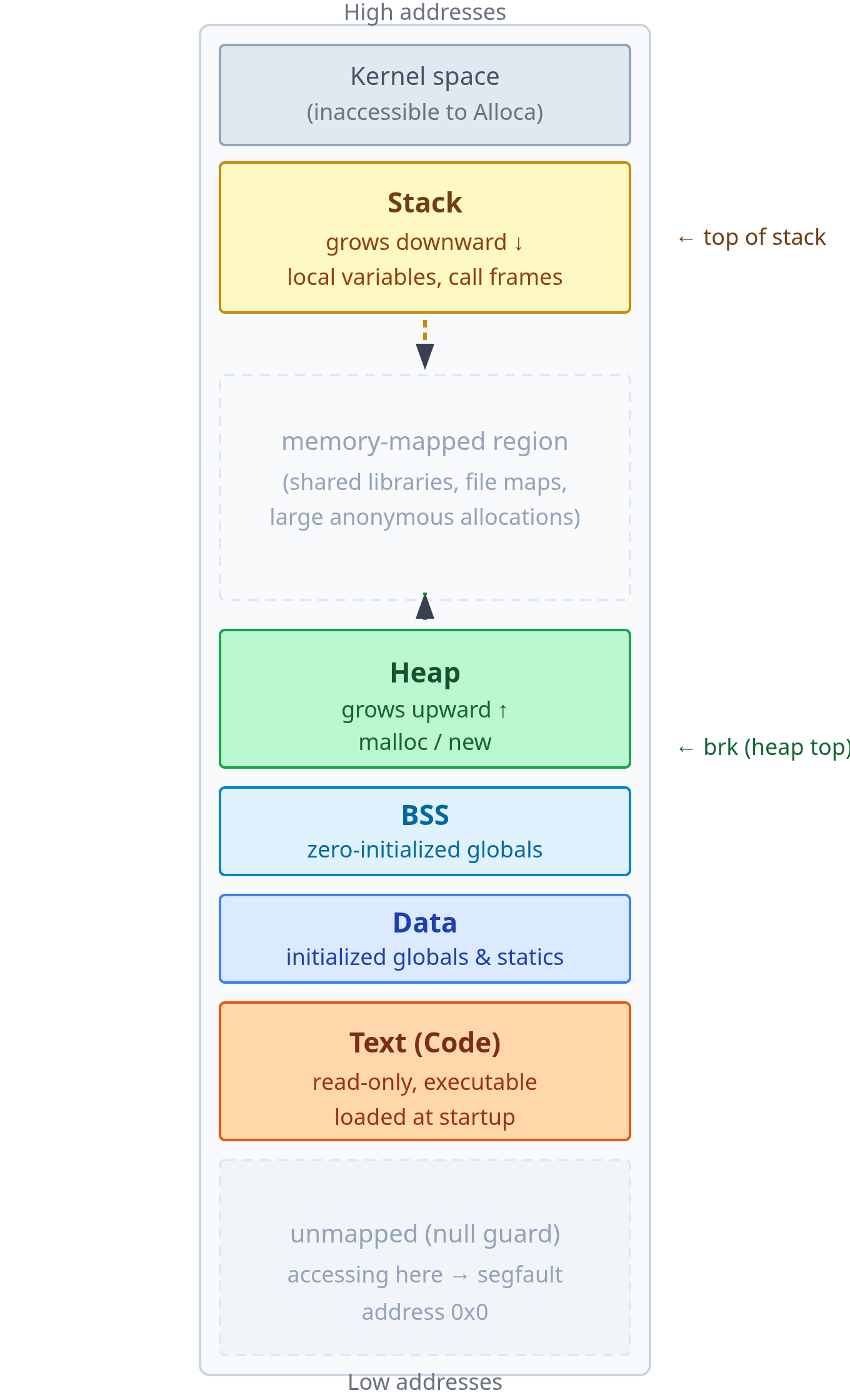
Kernel: “Down at the bottom, at low addresses, is your code. These are the instructions that you execute. This region is loaded when I created you. We call this the text segment.”
Alloca: “Makes sense. Above that I see there is data segment, I assume it maps all the other data?”
Kernel: “Not all the data, but a specific kind of data. Any global and static variables in your code that were initialized to non-zero values are loaded here. For example, if you created a constant
piwith value3.14, it will be in the data segment.”Alloca: “What about unintialized global data? Where does that go?”
Kernel: “The bss segment.”
Alloca: “Why a separate segment for that?”
Kernel: “Ah, it’s a clever trick for efficiency. Think about it: if you have a global variable that’s uninitialized, what value should it have when your program starts?”
Alloca: “Zero, I suppose.”
Kernel: “Exactly! Now imagine you have thousands of these zero-initialized globals. If we stored all those zeros in your compiled binary, the file would be bloated with zeros. That’s wasteful. So instead of doing that, the compiler and linker just make a note saying ‘hey, this program needs, say, 50 kilobytes of zero-initialized memory.’ They don’t actually put those zeros in the binary file. Then, when I load your program, I allocate that 50 KB, fill it with zeros, and map it into your address space as the BSS segment. Your binary stays small, loads faster, and you still get all your zero-initialized variables. Everyone wins.”
Alloca: “That’s clever! So the data and the bss segments are where all the static data goes. What about dynamic data? For example, when I add a new node to a linked list at runtime, does that memory get allocated in one of these segments?”
Kernel: “No, it can’t be. Think about it: can the data or BSS segments grow after your program starts?”
Alloca: “I guess not? You said their sizes are determined at compile and link time.”
Kernel: “Correct! They map your program’s static memory footprint based on everything the compiler knew from the code when it built your binary. But at runtime, you need to allocate memory dynamically. You might read a file and build a tree from its contents. The compiler had no way to know how much memory you’d need for that.”
Alloca: “So where does that memory come from?”
Kernel: “That’s what the heap is for. It sits right above BSS, and as you can see from the diagram, there’s a large stretch of empty address space above it.”
Alloca: “So the heap can grow into that empty space?”
Kernel: “Precisely! When you call malloc(), the allocator typically grows the heap upward by adjusting its upper boundary. We call that boundary the program break, or just
brkfor short. Each time you need more memory, the heap can expand upward into that unused region.”Alloca: “I see. But looking at the diagram, that empty region above the heap is enormous compared to everything else. The heap, stack, and all the segments look tiny by comparison. What is all that space?”
Kernel: “That space is basically the unmapped part of your address space.”
Alloca: “Unmapped? Why are there unmapped addresses?”
Kernel: “Glad that you asked, it’s really important to understand this part. Remember when we talked about the size of your virtual address space being 128 TiB?”
Alloca: “Yeah, you said that’s way bigger than the actual physical RAM in the machine.”
Kernel: “Yeah. A typical machine might have 16 or 32 GB of physical RAM. Even a beefy server with 256 GB of RAM is nowhere close to 128 TiB. So, it is not practically possible to map all of your virtual addresses to physical memory because there is simply not enough of it. And, even if there is a machine with 128 TiB of RAM installed, it doesn’t make sense to map all of it”
Alloca: “Why not?”
Kernel: “Because most programs probably use a few hundred megabytes at most, so the clever thing to do is to allocate and map only the required amount of memory to the process, leave the rest unmapped, and map it lazily based on demand.”
Alloca: “So what happens if I try to access one of those unmapped addresses?”
Kernel: “Well, if it’s an address I gave you, say from a successful
malloc()or mmap() call, then it’s yours to use. But if you just pick a random address in that unmapped region and try to read or write it, you’ll get a segmentation fault. The hardware will refuse the access because there’s no valid mapping.”Alloca: “Got it. So the unmapped region isn’t just empty space, it’s reserved space that can become mapped as needed?”
Kernel: “Exactly! And it gets mapped for several purposes. When you load a shared library, like
libc.so, I need to map its code and data somewhere in your address space. That middle region is where those libraries go. Same with file mappings: when you usemmap()to map a file into memory, it gets mapped here. Large allocations frommalloc()also often come from this region rather than growing the heap.”Alloca: “So it’s a flexible region for all kinds of dynamic mappings?”
Kernel: “Precisely! It’s the largest part of your address space, and it’s there to accommodate whatever dynamic memory needs arise during your execution.”
Alloca: “That leaves the stack at the top. What is that?”
Kernel: “It is a dedicated region for managing function calls. Every time you call a function, the stack is involved.”
Alloca: “Why does calling a function need its own memory region? Why not use one of the other segments?”
Kernel: “Let’s think about what needs to happen when you call a function. What kind of data does a function need?”
Alloca: “Well, its local variables, I suppose. And probably the return address so it knows where to jump back to when it’s done?”
Kernel: “Exactly! And also the CPU register values that need to be saved and later restored when the function returns. Now, all of this needs to be allocated when a function is called and cleaned up automatically when it returns. Which of the segments we’ve discussed could handle something like this?”
Alloca: “Not the data or BSS segments, those are fixed in size. They can’t grow and shrink.”
Kernel: “What about the heap?”
Alloca: “The heap can grow, but I’d have to explicitly
mallocandfree, right? That would be tedious, slow, and error-prone for every function call.”Kernel: “Yeah, what you need is a region that grows and shrinks automatically as functions are called and return. It needs to follow a very specific pattern: the last function you called is the first one that returns. Does that sound familiar?”
Alloca: “That’s… last-in-first-out. Like a stack data structure!”
Kernel: “Precisely! That’s why we call it the stack. The processor even has dedicated instructions,
pushandpop, that work with a special register called the stack pointer. This register tracks the current top of the stack. When you call a function, all its data (local variables, saved registers, return address) ends up on the stack. When you return, that block gets popped off. All automatic, no manual memory management needed.”Alloca: “So it’s about automatic lifetime management for function-local data. But what happens if there is a very deep chain of function calls? Can the stack grow indefinitely?
Kernel: “Not quite. As one function calls another, space needs to be made on the stack to accommodate the local variables of the called function. But there is a limit to how much the stack can grow. For example, on x86-64, the default configured maximum size of the stack is 8 MB.”
Alloca: “But as I can see, the stack is right at the top of the address space, where does it have room to grow?”
Kernel: “Good observation! The stack is usually mapped at the higher address range and it grows by moving towards the lower address ranges. So, for example, if the stack pointer is currently 0x120008 and you push an 8 byte value on the stack, the stack pointer becomes 0x120000”
Alloca: “So the heap grows upward and the stack grows downward?”
Kernel: “Yes. The empty space between them is the buffer that lets both grow without colliding. In practice, a process runs out of one or the other long before they meet.”
Alloca: “Okay, I understand the layout now. But I’ve one final question about it, what is the need for such a layout? Why not simply store data anywhere you find space?”
Kernel: “Great question! There are two big reasons: performance and security. Which one would you like to hear about first?”
Alloca: “Let’s start with performance.”
Kernel: “Alright. Tell me, if you are reading a value from an array at index 5, what do you do after that?”
Alloca: “Well, I probably would read index 6, then 7, and so on? Most array processing is sequential like that.”
Kernel: “Exactly! And when you’re executing instructions in your code, you typically run them one after another, right? You’re not randomly jumping all over the place.”
Alloca: “Right, except for loops and function calls, it’s mostly sequential.”
Kernel: “Yes! This pattern of accessing nearby memory locations is so common that the hardware is designed around it. But, fetching data from physical memory is slow. Really slow. It can take hundreds of CPU cycles.”
Alloca: “That sounds terrible!”
Kernel: “It would be, if the CPU actually went to main memory for every single read. But it doesn’t. The CPU has a fast cache, smaller but much faster storage right on the chip. And this is the clever bit: when you read a value from memory, the hardware doesn’t just fetch that one value. It fetches an entire block around it, typically 64 bytes, called a cache line.”
Alloca: “So it’s betting that I’ll need the nearby data too?”
Kernel: “Precisely! And because of how you traverse arrays or execute sequential instructions, that bet pays off most of the time. The next value you need is already sitting in the cache, ready instantly. This is called spatial locality.”
Alloca: “Ah, so that’s why the organized layout helps! If my heap has all my data structures, and I’m traversing a linked list, the nodes are likely to be near each other in memory?”
Kernel: “Well, linked lists are actually a bad example, their nodes can be scattered all over the heap. But arrays, yes! And more importantly, think about your stack. When you’re executing a function, you’re constantly accessing its local variables. Because they’re all packed together in one stack frame, most of those accesses hit the cache.”
Alloca: “And the same applies to code in the text segment?”
Kernel: “Exactly. Your instructions execute sequentially, so the processor can even prefetch the next cache line before you ask for it. By keeping code separate from data, and keeping different types of data in their own regions, we maximize these cache-friendly access patterns.”
Alloca: “That makes sense! What about security? How does the layout help there?”
Kernel: “Let me ask you this: if an attacker managed to write arbitrary bytes into your heap, say through a buffer overflow bug, what’s the worst thing they could do?”
Alloca: “Um, corrupt my data structures? Make my program crash?”
Kernel: “That’s bad, but there’s something worse. What if those bytes they wrote were actually machine instructions? And what if they then tricked your program into jumping to that address?”
Alloca: “Oh no… then the CPU would execute their malicious code as if it were part of my program!”
Kernel: “Exactly. And without protection, they could also try to overwrite your actual code in the text segment, inserting a backdoor directly into your program.”
Alloca: “So how do we prevent that?”
Kernel: “By giving each segment permission bits. Think about what should be allowed for each segment. Should you be able to write to your code segment?”
Alloca: “No, the code is fixed! It shouldn’t change while the program runs.”
Kernel: “Right. So the text segment is marked read-only and executable: you can run code from it, but you cannot write to it. Now, what about your heap and stack?”
Alloca: “I need to read and write data there all the time. But I should never execute code from there, right?”
Kernel: “Perfect! The heap and stack are marked read-write but not executable. You can modify your data, but if someone tries to jump to an address in the heap and execute it, the processor will refuse and kill your process.”
Alloca: “So by separating code from data, we can enforce different permissions on each?”
Kernel: “Precisely. This is often called W^X protection (write XOR execute). Memory can be writable or executable, but not both. By organizing memory into distinct segments, we make this protection model clean and enforceable.”
Key Takeaway
The virtual address space is organized into several distinct segments:
Text (code) segment: The compiled instructions of the program. Loaded at startup, mapped read-only and executable. The process cannot write to its own code pages.
Data segment: Global and static variables that have been explicitly initialized. Size is fixed at link time.
BSS segment: Global and static variables that are zero-initialized. The binary stores no data for this region; the loader provides zero-initialized memory for it at startup.
Heap: The region for dynamic memory allocation (
malloc/new). Starts just above the data/BSS segments and grows upward for small allocations; its upper boundary is called the program break (brk). Many allocators also usemmapdirectly for large allocations rather than growing the heap viabrk.Memory-mapped region: A large, flexible area in the middle of the address space used for shared libraries, file mappings, and anonymous large allocations. Libraries like
libcare loaded here.Stack: Holds the call frames of all currently executing functions. Starts near the top of the address space and grows downward. Each function call pushes a frame containing local variables, saved registers, and the return address; each return pops it.
Aside: Anonymous memory
Throughout the article, we will come across a term “anonymous memory”, it is important that we understand what it means.
The kernel manages two kinds of memories:
Anonymous memory: this is allocated using
mallocormmapwith theMAP_ANONYMOUSflag. This is also the memory backing a process’s heap, stack and similar segments.File-backed memory: this is the memory which is backed by a file. You normally create it using
mmapand passing a file descriptor to it.
We will cover both of these in quite detail as we progress through the article, but having this common vocabulary will help us move faster.
How are Virtual Addresses Translated to Physical Addresses
Alloca: “I understand the layout. Code down here, stack up there. But these are all virtual addresses. How does a virtual address ever become real? I’m imagining you keep a table, virtual byte 0 maps to physical byte X, virtual byte 1 maps to physical byte Y, one entry for every address. Is that how it works?”
Kernel: “That’s the natural first thought. Let’s see what it costs. Your address space (the user-space half) is 128 TiB, that’s roughly 140 trillion bytes. At 8 bytes per table entry, a per-byte mapping table would take 1 PiB of storage per process. That’s impractical.”
Alloca: “So a per-byte table is out. But you do need a lookup of some kind.”
Kernel: “Yes, we do. But, instead of mapping individual bytes, we map fixed-size chunks. I divide your virtual address space into fixed-size chunks called pages, and I divide physical memory into same-sized chunks called frames. Each virtual page maps to one physical frame at a time. One table entry per page, not per byte. This way we don’t waste too much space maintaining the mapping itself.”
Alloca: “How large are these chunks?”
Kernel: “4 kilobytes. At that size, your 128 TiB address space divides into 235 pages.”
Alloca: “Wait, why 4 kilobytes specifically? Why not map smaller chunks like 1 kilobyte, or larger ones like 64 kilobytes?”
Kernel: “Good question! Let me ask you this: when you read a variable from memory, say an integer, do you usually read just that one value and nothing else nearby?”
Alloca: “Well, no. If I’m reading
array[5], I probably readarray[6]andarray[7]soon after. And when executing code, I run instructions sequentially, one after another.”Kernel: “Exactly! Memory accesses happen in clusters, spatial locality again. The hardware already exploits this with 64-byte cache lines; pages work the same way at a coarser scale. 4 KB is a sweet spot: large enough that related data usually falls within the same page, but also small enough that we don’t waste physical memory when only part of a page is touched.”
Alloca: “So 4 KB is a sweet spot between granularity and efficiency?”
Kernel: “Right. And because every page and every frame is exactly the same size, any free frame can back any page. It doesn’t matter where in physical memory that frame happens to sit.”
Alloca: “Okay, I understand the page size. But there is something that I still don’t get: you’re mapping an entire 4 KB page to an entire 4 KB frame. But, I have a specific address, and I want to read 8 bytes from it. How do you find out which virtual page that address belongs to, to get the corresponding physical frame?”
Kernel: “The answer lies in the virtual address itself. Think of it like a library call number. When a librarian gives you the number 3-07-42, you know immediately that the book is on floor 3, rack 07, shelf 42. The number encodes two things at once: which shelf unit to find, and where within that unit to look. A virtual address works the same way. It encodes which page the address falls in, and the byte position within that page.”
Alloca: “So the address itself tells you both the page and the position inside it?”
Kernel: “Yes. Every virtual address is implicitly two things: the virtual page number, given by the upper bits, and the page offset given by the lower 12 bits. 12 bits because 2¹² = 4096, one for every byte in a page. Say your address points 500 bytes into page N. When I map page N to physical frame M, your data is still 500 bytes in, because the frame is the same 4 KB size. The offset does not change during translation. So I look up the virtual page number in your page table, get back the physical frame number, attach the same offset, and that gives the physical address of exactly the 8 bytes you asked for.”
Alloca: “Okay, I understand that part. But something is still not clear. You said that my address space is 128 TiB. If there’s one page table entry per 4 KB page, that’s 235 entries. At 8 bytes each entry, that’s 256 GiB of page table. Per process. That’s not workable.”
Kernel: “Exactly, that’s the problem with a flat table. So let me ask you this: what if, instead of tracking every single page, we tracked which regions of your address space are in use?”
Alloca: “Regions? Like groups of pages?”
Kernel: “Yes. Think about your address space. You have code at the bottom, a heap above that, maybe some libraries in the middle, and a stack at the top. Most of the space between them is empty, right?”
Alloca: “Right, huge stretches of unused addresses.”
Kernel: “So what if I had a high-level index that just tracks which large regions are in use, and then within each of those regions, I have another index for smaller regions, and so on, until I get down to individual pages?”
Alloca: “Like… a tree structure? Where each level zooms in on a smaller portion?”
Kernel: “Precisely! It’s called a hierarchical page table. There are four levels. At the top level, there’s a table with 512 entries, and each entry represents 512 GB of your address space. If an entire 512 GB region is unused, that entry is just marked absent, no further tables are allocated for it.”
Alloca: “So you only allocate the deeper levels of the tree for the parts I’m actually using?”
Kernel: “Yeah. Each entry at the top level can point to a second-level table, which again has 512 entries, each covering 1 GB. Each of those can point to a third-level table covering smaller regions, and so on, until the deepest level maps to individual 4 KB pages.”
Alloca: “But wait, doesn’t having four levels still waste space? If I use just one page, don’t you still need entries at every level to reach it?”
Kernel: “Yes, but consider the scale. For that one used page, I need one entry in the top-level table, one second-level table with 512 entries, one third-level table with 512 entries, and one fourth-level table with 512 entries. That’s roughly 12 KB total. Compare that to a flat table: 235 entries times 8 bytes equals 256 GiB. I save a factor of 20 million.”
Alloca: “So the table itself only exists for the parts of my address space I’ve actually used.”
Kernel: “Correct!”
Aside: Page table level names difference between Linux and x86
The four levels of the page table hierarchy have different names depending on whether you’re reading Linux kernel source or Intel/AMD architecture manuals.
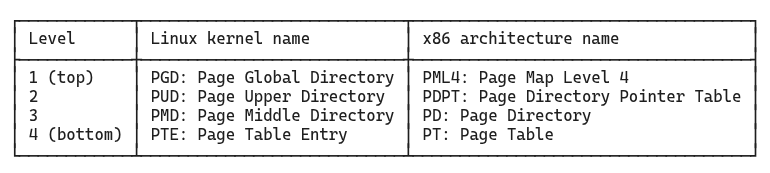
The x86 names are tied to the specific architecture. The Linux names are more generic and are used consistently across architectures that Linux supports, whether that’s x86-64, ARM64, or RISC-V, even when the underlying hardware has a different number of levels. Throughout this article we use the Linux kernel names: PGD, PUD, PMD, and PTE.
Alloca: “But how does a virtual address help you traverse this?”
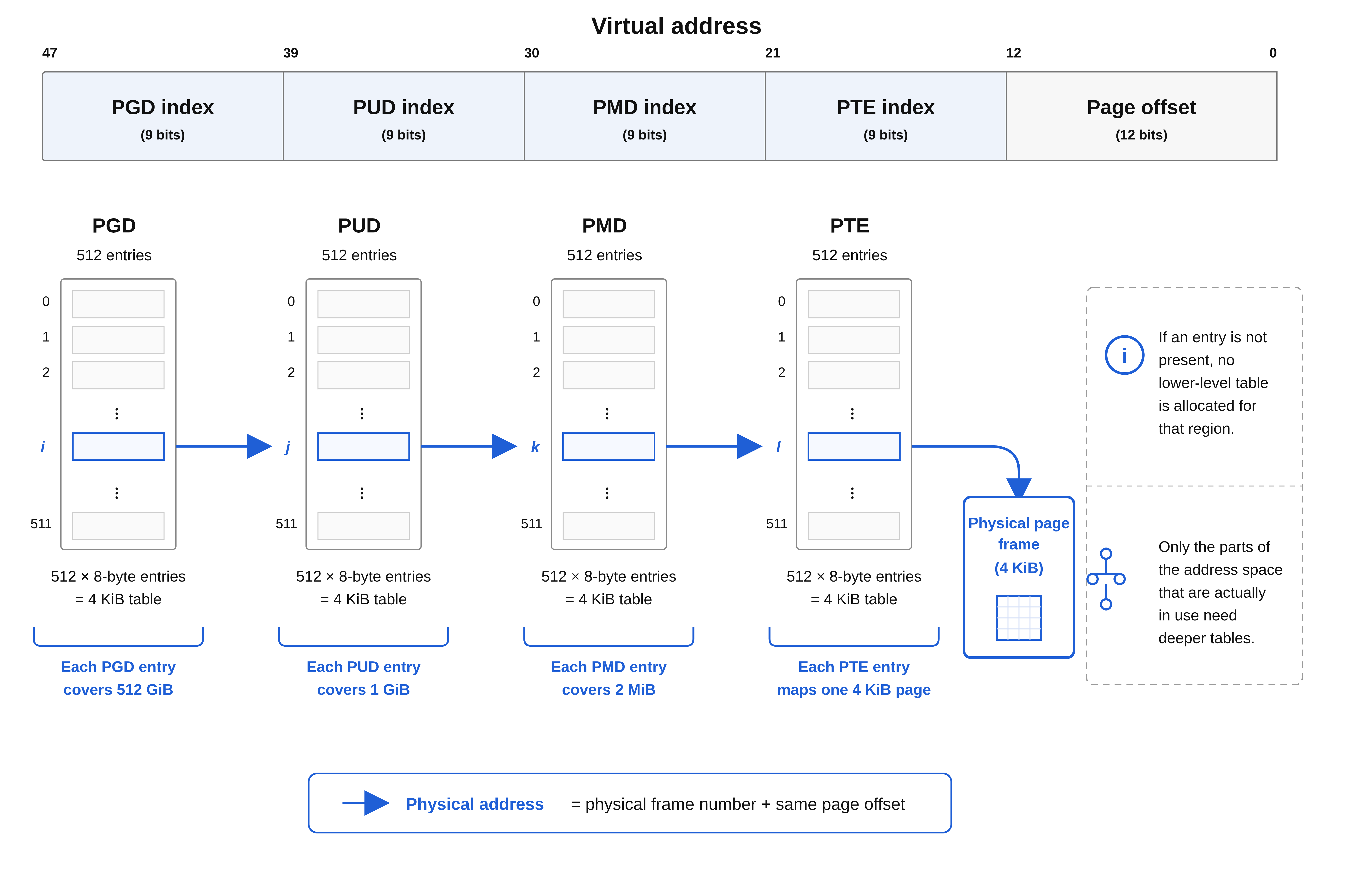
Kernel: “It’s actually pretty clever. Your virtual addresses are 64 bits wide, but only 48 bits are used. Those 48 bits are split into five parts: four groups of 9 bits each, followed by a 12-bit offset. The first four groups are used one by one to step through each level of the page table tree, narrowing down to the right physical frame. The offset is then used to pinpoint the exact byte within that frame.”
Alloca: “What is the exact split of these bits?”
Kernel: “The first group (bits 47 down to 39) gives a number between 0 and 511, which I use as an index into the PGD. That entry points me to a PUD. I take the next group (bits 38 down to 30) and index into that PUD, which points to a PMD. I repeat this for the PMD and PTE levels.”
Alloca: “That leaves the bottom 12 bits, those act as offset within the page frame?”
Kernel: “Yes, once you reach the PTE and get the physical frame number, you combine it with those 12 bits to get the exact byte you want. 12 bits because 212 is 4096, the page size.”
Aside: 48-bit virtual addresses
On common 4-level x86-64 systems, virtual addresses are stored in 64-bit registers, but you should have noticed that only 48 bits participate in this address translation scheme, what about the top 16 bits?
The top 16 bits must be a sign-extension of bit 47: all zeroes for low-half user-space addresses, all ones for high-half kernel-space addresses. Such addresses are called canonical addresses. A non-canonical address faults before the normal page-table walk even completes. This is what creates the large unused gap between the low and high halves of the 64-bit virtual address space.
Recent x86-64 processors and Linux kernels also support 5-level page tables, which use 57 bits for address translation (adding a fifth level called P4D (Page 4th Directory) between the PGD and PUD). This provides 2⁵⁷ bytes (128 PiB) of virtual address space per process. The additional level uses bits [56:48] as an index, with bits [63:57] remaining as sign-extension of bit 56.
Alloca: “I see how the bits map to the levels. But who actually performs this translation? On every memory access, something has to look up these tables.”
Kernel: “A dedicated piece of hardware called the Memory Management Unit, or MMU. It intercepts every address you issue. You never see any of this; to you it appears as if you are reading directly from your virtual address.”
Alloca: “So the MMU does this lookup automatically on every memory access? How does it know where to start?”
Kernel: “The CPU has a register called
CR3that holds the physical address of your current PGD, the top-level table. I update it on every context switch so the MMU knows which process’s tables to use.”Alloca: “And then it uses the bits from my address to walk through the levels?”
Kernel: “Yeah, the same bit fields we just covered. Bits [47:39] index into the PGD, [38:30] into the PUD, [29:21] into the PMD, and [20:12] into the PTE. That last entry gives the physical frame number, which the MMU combines with the 12-bit page offset to produce the physical address.”

Alloca: “But this means every memory access now requires four table lookups. That’s four extra memory reads just to translate my address. Doesn’t that make every memory access slower than it should be?”
Kernel: “It would be, if we had to walk all four levels every time. But the MMU has a small, dedicated hardware cache called the Translation Lookaside Buffer, or TLB. Every time a page table walk completes successfully, the result is stored in the TLB: ‘virtual page P maps to physical frame F.’ The next time you access the same page, the MMU checks the TLB first. If it’s there (a TLB hit), the translation completes in a handful of cycles, with no table walking at all.”
Alloca: “And how often does that happen?”
Kernel: “Programs that reuse the same memory regions repeatedly, such as tight loops, frequently executed functions, reused buffers, tend to stay within a small working set of pages, keeping the TLB warm and page walks rare. But that is not a given. Access patterns matter a great deal.”
Aside: Working set
A process’s working set is the subset of its virtual pages that are actively needed during a given window of execution. It’s not a fixed quantity, it shifts as the program moves through different phases. A tight loop over a small array has a tiny working set: just the pages holding the loop instructions and the array. A database engine scanning a large table has a much larger one.
The working set matters for two hardware structures:
TLB: If the working set fits within the TLB’s capacity (typically a few hundred to a few thousand entries), translations stay cached and page walks are rare. If the working set exceeds TLB capacity, there are larger number of TLB misses which may cost performance.
Physical RAM: If the working set fits in RAM, pages stay resident. If it doesn’t, the kernel must evict pages to swap and reload them on demand, which is a far more expensive operation (we cover eviction and swap later in the article).
Keeping the working set small and stable is one of the most effective things a program can do to improve memory performance.
Key Takeaway
Virtual memory operates at the granularity of pages (4 KB chunks of virtual address space) that map to frames (4 KB chunks of physical memory). Each virtual address encodes two pieces of information: the virtual page number (upper bits) and the page offset (lower 12 bits). The offset stays the same during translation; only the page number changes to a frame number.
On x86-64, the kernel uses a four-level hierarchical page table to perform this mapping. The structure has four levels named PGD (Page Global Directory), PUD (Page Upper Directory), PMD (Page Middle Directory), and PTE (Page Table Entry). A 48-bit virtual address is divided into four 9-bit index fields (one per level) plus a 12-bit offset, as shown in Figure 2. The hierarchy is sparse: only the portions of the address space actually in use require allocated page table structures, avoiding the 256 GiB overhead of a flat table.
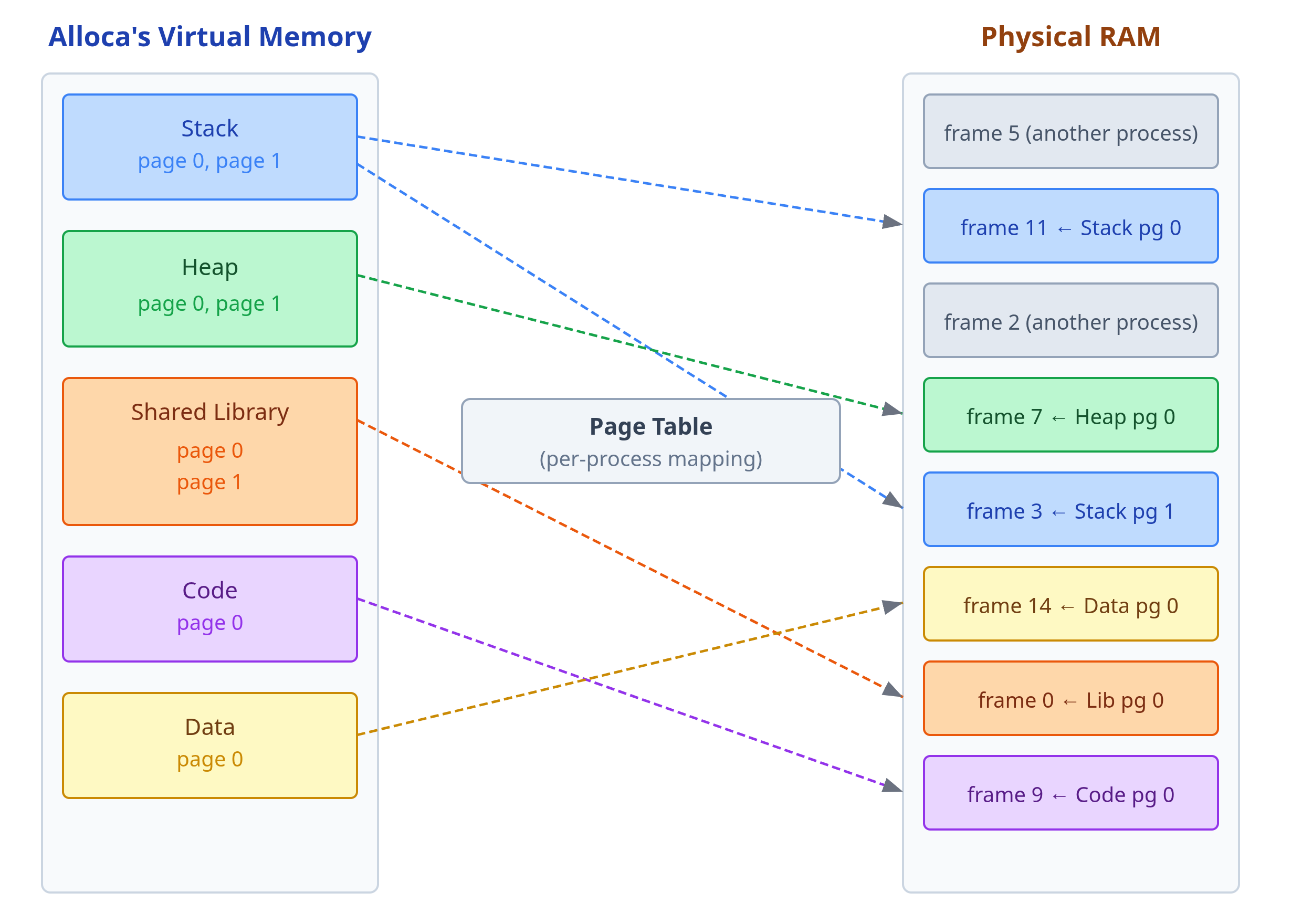
Because each virtual page is mapped independently, there is no requirement that consecutive virtual pages land in consecutive physical frames. A process’s pages can be scattered anywhere in physical RAM, interleaved with frames from other processes, yet the process always sees a clean, contiguous address space. Figure 4 shows this concretely.
The Memory Management Unit (MMU) performs address translation in hardware. On x86, the register CR3 holds the physical address of the current process’s PGD. On every memory access, the MMU first checks the translation lookaside buffer (TLB) to see if the translation is already cached. If not, the MMU performs a full page table walk to do the translation and then caches the translation in the TLB.
Memory Protection via Permission Bits
Alloca: “Earlier you told me that my code segment is read-only. I can execute it but not write to it. But now that I understand the page table, I don’t see what actually enforces that. My code pages have entries in the page table just like everything else. What stops me from writing to them?”
Kernel: “Each page table entry carries more than just the frame number. It also holds permission bits. The writable bit says whether you can write to that page, if it is 0, the MMU refuses the write and faults: it stops the access mid-flight and signals me to handle the situation. The executable bit says whether you can run code from it. When I set up your code segment I mark those pages as executable but not writable. Your data and heap are writable but not executable. The MMU checks these bits on every access.”
Alloca: “What happens when it faults? Say I try to write to one of my code pages?”
Kernel: “I get called to handle it. A permission violation is almost always a bug or a security attack, so I typically terminate you.”
Alloca: “Got it. Are there other kinds of bits apart from permission bits?”
Kernel: “Yes, a very important one that you should know about. There is a present bit in every entry, at every level of the hierarchy. If it is 0, the walk stops there and the CPU faults. But a not-present entry doesn’t necessarily mean something went wrong. It might just mean that I haven’t allocated a physical frame for that page yet, or that the page has been evicted to disk.”
Alloca: “So the permission bits enforce boundaries between code and data, and the present bit tells you whether a page is backed by physical memory at all.”
Kernel: “Exactly!”
Key Takeaway
Each page table entry contains not just a frame number but also several permission bits that the MMU enforces on every memory access:
Present bit: Indicates whether the page is currently backed by a physical frame. If 0, the page table walk stops and the CPU raises a page fault. A not-present page doesn’t always signal an error; it might mean the kernel has promised the address range but hasn’t yet allocated physical memory for it (demand paging, covered in the next section). It might also mean that the physical frame was swapped to disk and reused by another process.
Writable bit: Controls write permission. If 0, any write attempt triggers a fault. Used to make code pages read-only and to implement copy-on-write (covered later).
Executable bit (or NX/XD bit): Controls execution permission. If the page is marked non-executable, the processor refuses to fetch instructions from it. Code pages are marked executable; data, heap, and stack pages are marked non-executable to prevent code injection attacks.
The MMU checks these permission bits on every memory access, before the access completes. Permission violations typically indicate bugs or security violations and usually result in the kernel terminating the faulting process. This hardware-enforced separation between code and data is a foundational defense against many classes of exploits.
Demand Paging
Some time passes. Alloca has been running her code and has grown more comfortable in this world. But now she needs more memory, she is about to process a large dataset and needs space to store intermediate results.
She does what any process would do: she makes a system call asking for memory. A new region appears in her address space. Kernel hands her an address: 0x55a3c2f00000. She immediately goes to write her first value there.
And then something strange happens. Time seems to stop for a fraction of a moment. And then it starts again, as if nothing had occurred. Her write went through. But something had happened, she had simply not noticed.
Alloca: “That was odd. Did I just… stutter?”
Kernel: “You did. You triggered a page fault. Don’t worry, I took care of it.”
Alloca: “A page fault? What’s that? And what did you take care of?”
Kernel: “When I gave you that address, I didn’t actually back it with physical memory. I recorded the promise that this range of virtual addresses belongs to you, but I didn’t go and find a physical frame to put behind it.”
Alloca: “You gave me an address without any memory behind it? That sounds like fraud.”
Kernel: “It’s efficiency. Think about it: you might ask for a hundred megabytes and only use ten. If I allocated a physical frame for every page you asked for, I’d be wasting most of physical memory on pages that never get touched. So instead, I wait. When you actually try to access a page for the first time, the MMU looks up that address in your page table and finds the present bit set to zero. No physical frame is mapped. The MMU raises a trap (a page fault) and control transfers to me.”
Alloca: “But how did you know my access was valid? Maybe I was accessing some address I had no right to. How do you tell the difference?”
Kernel: “When I gave you that memory region, I recorded a note called a virtual memory area, or VMA. It says: ‘virtual addresses from X to Y are promised to Alloca, with these permissions.’ The VMA is not a page table entry. It’s a higher-level record of intent that I maintain separately.”
Alloca: “So you have two different data structures tracking my memory?”
Kernel: “Yes. The VMA describes what address ranges are valid for you to access. The page table describes which of those valid pages are currently backed by physical frames. When you were created, I set up VMAs for your code segment, your data segment, your stack. Each one records an address range and what you’re allowed to do there: read, write, execute. Later, when you call
mallocormmap, I create a new VMA for that allocation. But I don’t immediately create page table entries for it.”Alloca: “So when the MMU finds a missing page table entry for an address, it triggers a page fault?”
Kernel: “Yes. When a page fault fires, I have to handle it. I first check whether the faulting address falls inside a valid VMA. If yes, the access is legitimate. I just haven’t backed it with a physical frame yet. If the address is outside any VMA, you’ve wandered somewhere you were never given. That’s a segmentation fault, and I terminate you.”
Alloca: “So the VMA list is your record of promises, and the page table is the record of fulfilments.”
Kernel: “Well put. Now, once I confirm the fault is legitimate, I find a pre-zeroed physical frame, write a new entry into your page table pointing to that frame, and resume your execution. The CPU retries the faulting instruction and your write goes through.”

Alloca: “Wait. Why did you zero it out? Couldn’t you just give me the frame as-is?”
Kernel: “Absolutely not. Physical frames get reused. That frame might have previously held data from another process. If I handed you that frame without clearing it first, you could read another process’s secrets just by reading uninitialized memory. The zero-fill guarantee is a security invariant: you will never see data you didn’t write yourself.”
Alloca: “That’s reassuring. But what if there are no free frames? What if physical memory is full?”
Kernel: “It happens more often than you’d expect, and dealing with it changes what the present bit in a PTE can mean.”
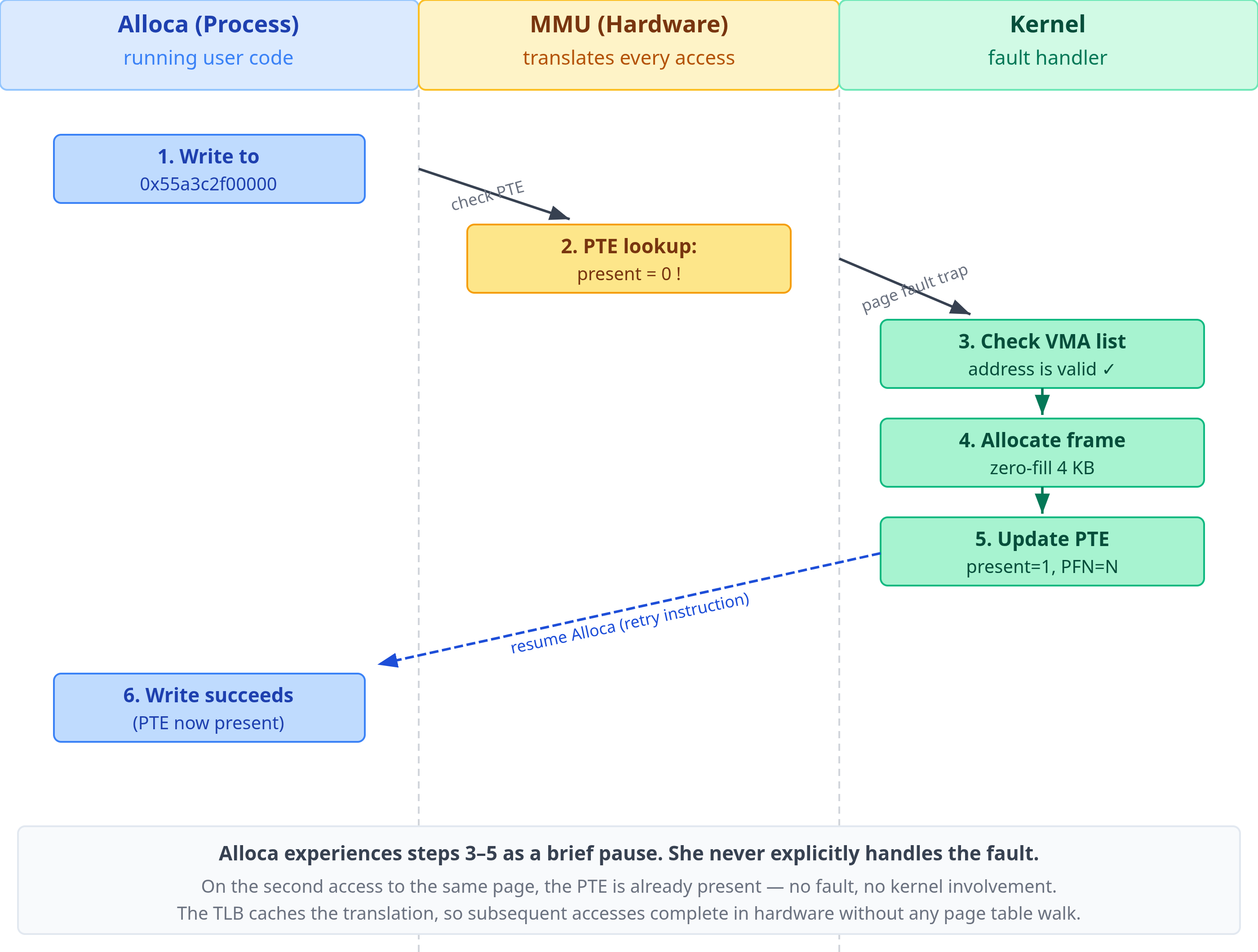
Aside 1: How the stack grows using demand paging
Remember, when talking about address space layout, we said the stack grows downward. That growth is demand-driven too. The kernel marks the stack VMA as growable, but it does not map every possible stack page upfront. When the stack pointer moves into the next valid page below the current stack, the access faults. Because the faulting address is just below the current stack bottom and the stack VMA is marked as growable, the kernel extends the VMA downward by one page, allocates a frame, and resumes execution. From Alloca’s perspective the stack just grew silently.
Two mechanisms prevent this from continuing forever. First, the kernel enforces a maximum stack size (on Linux, set by ulimit -s, defaulting to 8 MB). The stack VMA will not be extended past that limit. Second, below the maximum stack limit sits a guard page: a single page that is deliberately left unmapped, no VMA covers it. If the stack pointer jumps far enough to land in or past the guard page (due to deep recursion, a large stack-allocated array, or a corrupted stack pointer), the fault finds no covering VMA. The kernel treats that as an invalid access and delivers SIGSEGV.
The guard page is what turns a silent runaway stack into a detectable crash. Without it, the stack could silently overflow into the memory-mapped region below it and corrupt library or heap data before anything notices.
Aside 2: Memory overcommit: a consequence of demand paging
Demand paging creates an interesting situation: if the kernel only allocates physical frames at first-access time, then malloc(10GB) on a machine with 4 GB of RAM will succeed (at least initially). The kernel records the promise in a VMA and returns immediately. No frames are allocated. This is called overcommitting memory: the total size of all VMAs across all running processes can far exceed the amount of physical RAM plus swap.
The kernel’s bet is statistical. In practice, most allocated memory is never fully touched. A process might allocate a large buffer “just in case” and only ever write to a fraction of it. A JVM might reserve a large heap up front but populate it lazily. Across hundreds of processes, the working sets sum to much less than the total committed virtual memory, and the system runs fine.
The bet occasionally goes wrong. When too many processes start faulting in pages simultaneously, memory pressure spikes, and the kernel runs out of physical frames. At this point it invokes the OOM killer (Out-Of-Memory killer): a kernel subsystem that scores each process by its memory consumption, age, and other heuristics, then kills the highest-scoring one to reclaim its frames.
You can observe overcommit and OOM events on Linux:
# How much virtual memory is committed system-wide (in kB)

grep CommitLimit /proc/meminfo   # kernel’s ceiling: overcommit_ratio × RAM + swap

grep Committed_AS /proc/meminfo  # total virtual memory promised to all processes

# See if the OOM killer has fired recently

dmesg | grep -i “oom\|killed process”

journalctl -k | grep -i oom
The kernel’s overcommit policy is tunable via /proc/sys/vm/overcommit_memory:
0(default) uses heuristics1always allows any allocationand
2caps total committed memory atovercommit_ratio × RAM + swapand begins refusingmalloccalls that would exceed it.
Key Takeaway
When a process allocates memory, whether by calling malloc, growing its stack, or explicitly requesting memory via mmap, the kernel does not immediately back every page of that allocation with a physical frame. Instead, it creates a Virtual Memory Area (VMA) in the process’s memory descriptor: a record that says “this range of virtual addresses is valid and belongs to this process, with these permissions.” The page table entries for these pages are left absent (present bit = 0).
The VMA and the page table serve different roles:
The VMA is the kernel’s record of intent: what address ranges the process is allowed to access.
The page table is the record of reality: which virtual pages are currently backed by physical frames.
The first time the process reads or writes any address in an allocated-but-unmapped range, the MMU finds a page table entry with present=0 and raises a page fault, a CPU exception that transfers control to the kernel. The kernel’s page fault handler:
Looks up which VMA contains the faulting address. If none, the access is invalid and the kernel delivers a segmentation fault, terminating the process. Otherwise, it continues:
Allocates a free physical frame.
Zero-fills that frame (the zero-fill guarantee, required for security, ensures the process never sees data from a previous owner of that frame).
Installs a new page table entry pointing to that frame, with the present bit set.
Returns from the exception, causing the CPU to retry the faulting instruction.
From the process’s perspective, execution pauses for a few microseconds and then continues as if nothing happened. This mechanism is called demand paging: physical memory is allocated on demand, at the moment of first access, rather than speculatively at allocation time.
The fault described above requires no disk I/O: it is called a minor page fault. Minor faults cover any fault the kernel can resolve entirely in memory. This includes zero-fill for pages that aren’t backed by any file, but also cases where the data is already resident somewhere (in the page cache, or shared from another process) and just needs a PTE installed. There is a second kind of fault called major fault, that does require reading from disk. We will get to that next.
A side effect of demand paging is that physical frames are allocated one by one, on demand, from wherever free memory happens to be. There is no requirement that consecutive virtual pages land in consecutive physical frames. A process’s stack might occupy frames scattered across RAM, interleaved with frames belonging to completely different processes. The page table is what makes this invisible: it maps each virtual page independently, so the process always sees a clean, contiguous virtual address space regardless of where its frames physically reside.
Prefer reading this as a polished PDF? I’ve prepared a beautifully typeset PDF version for offline reading and reference. Buying it is another way to support the time that went into this article.
When Physical Memory Runs Out: Swap and the Dual Meaning of the Present Bit
Alloca: “So what happens when there is not enough free physical memory left to allocate?”
Kernel: “Let me show you. Let’s say that I need to allocate a frame for you, but they are all taken. So I must evict a page from somewhere, I look for a page that hasn’t been accessed recently. It could be from another process, or even one of your own pages. Once I find the page to evict, I write its contents to disk to a reserved area called swap space. Then I reclaim the frame and give it to you.”
Alloca: “And what happens if the process that owned that page tries to access it again?”
Kernel: “Before I give that frame to you, I update the process’s page table. I locate the PTE that points to that frame, clear its present bit to 0, and store the swap location in the remaining bits of the entry. The hardware never looks at those bits when present is 0, but I do when handling the page fault.”
Alloca: “So when that process touches the page again…”
Kernel: “The MMU sees the present bit is zero in the PTE, and it raises a page fault bringing me into action to handle it. My fault handler follows the same entry point as always: check the VMA first. In this case, because the page was swapped, its VMA must exist, so the fault handler moves forward and checks the PTE next. It finds the swap coordinates in the non-present bits, uses those to read the data from the disk, and loads it into a fresh frame. After that, it reinstalls the PTE with present=1. Once the page fault handler finishes, I resume the process and it retries the instruction that triggered the fault and this time it succeeds. It never knew the page had left.”
Aside: Minor vs Major Page Fault
Earlier in the demand paging section, we talked about minor page faults. Those kind of page faults don’t involve disk I/O and are handled directly in memory. For example, when malloc allocates more pages, the kernel simply creates the VMA, and allocates the physical frames on demand when the page fault occurs.
The page fault that we discussed above when a process tries to access a page that has been swapped to disk is a major page fault because handling it requires disk I/O.
Alloca: “So present=0 in a PTE always means that the data is in the swap?”
Kernel: “No. Swap is one destination, but it’s not the only one. A non-present PTE can point to data that lives somewhere other than swap space.”
Alloca: “Where else can it go besides swap?”
Kernel: “A file. Not every page comes from memory you allocated with
mallocor grew from the stack. Some pages map directly to content stored in a file on disk.”Alloca: “How does that work?”
Kernel: “You use the
mmapsystem call. It lets you map a file into your address space. When you do that, I create VMAs for the mapped range, but I leave the PTEs absent, just like withmalloc.”Alloca: “So on first access?”
Kernel: “This time again the MMU sees an absent PTE and raises a page fault. But handling this page fault is different from how I handle a page fault for a swapped page, or how I handle allocation of new memory like what we discussed when talking about demand paging earlier.”
Alloca: “What changes?”
Kernel: “The first step is the same, I check the VMA to confirm this is a valid region. But what happens next depends on the type of mapping.”
Alloca: “What’s different about a file-backed mapping?”
Kernel: “For anonymous mappings, a fault means either a fresh allocation where I hand you a new zero-filled frame, or a swap restore, where I read the page back from disk using the swap coordinates stored in the PTE. For file-backed mappings, there is no swap entry. Instead, the VMA itself tells me which file and which block of that file to read. I load that block into a frame, install it in the page table, and resume you.”
Alloca: “So at the PTE level, present=0 is just a signal: data is not in RAM. But the place to find it depends on what kind of mapping this is?”
Kernel: “Precisely. For anonymous memory pages that have been swapped, the non-present PTE can carry swap coordinates. For a file mapping that has not been loaded yet, I usually use the VMA to find the file and offset. Either way, the fault handler has enough information to reconstruct the page.”
Key Takeaway
When physical memory runs out, the kernel must reclaim frames. It selects pages that have not been accessed recently and evicts them. For anonymous pages (heap, stack, malloc), there is no file to fall back on, so the kernel writes the page’s contents to swap space on disk before freeing the frame. It then updates the PTE: the present bit is cleared to 0, and the remaining bits are repurposed to store swap coordinates (device number and page offset). These bits are ignored by the hardware; they exist solely as a private record for the kernel’s own fault handler.
When the evicted page is next accessed, the MMU finds present=0 and raises a major page fault. The fault handler reads the swap coordinates from the PTE, loads the page from disk into a fresh frame, reinstalls the PTE with present=1, and resumes the process.
However, a page fault for a file-backed mapping is handled slightly differently. Here, the VMA contains information about the file and the offset in the file needed to populate the frame.
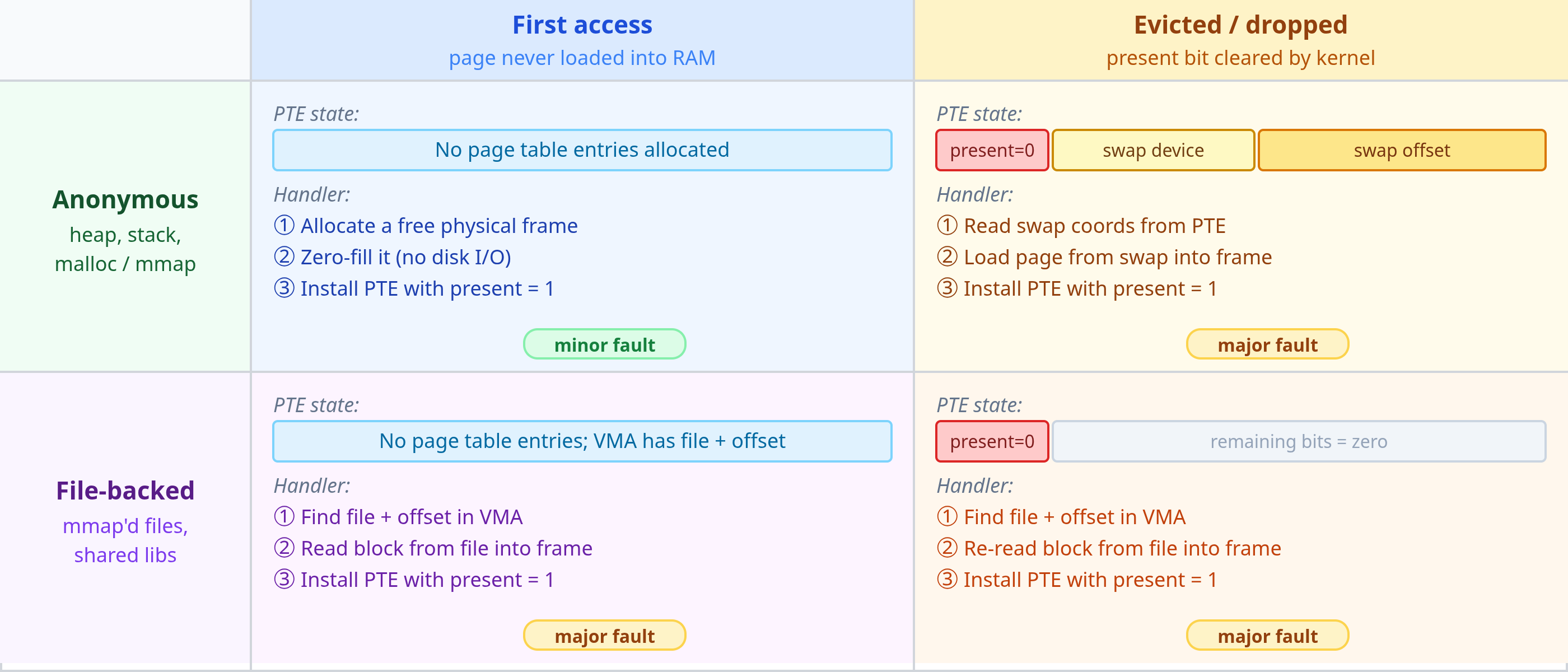
Together, anonymous and file-backed mappings cover all the cases a fault handler encounters. Two questions decide which path it takes:
What type of mapping is this? Anonymous memory has no file behind it. File-backed memory does.
Why is the page absent? A first-access fault (i.e., the frame was never allocated), or the page was evicted due to memory pressure and now being accessed again.
Figure 7 below shows all four combinations and how the fault handler resolves each
Aside: Pinned memory and GPU data transfers
Everything discussed so far assumes the kernel is free to evict any page when memory pressure demands it. There are cases where that is unacceptable. Pinned memory (also called page-locked memory) is memory that the kernel is prohibited from swapping out. A process can pin a region by calling mlock(), after which the kernel guarantees that the underlying physical frames will not be moved or reclaimed for as long as the lock is held.
The most common reason to pin memory today is GPU data transfers. DMA (Direct Memory Access) engines, which move data between host RAM and GPU memory without CPU involvement, require that the source or destination buffer remain at a fixed physical address for the duration of the transfer. If the kernel were to evict a page mid-transfer and reassign the frame, the DMA engine would read or write the wrong physical location. Pinning prevents this by fixing the physical address in place.
This is why AI training frameworks pin host memory for input batches. In PyTorch, tensor.pin_memory() and the pin_memory=True option on DataLoader call mlock() under the hood. With pinned buffers, the CUDA driver can initiate DMA transfers directly from host RAM to GPU memory without an intermediate copy, and it can overlap those transfers with GPU computation. On large models trained on high-bandwidth interconnects (NVLink, PCIe 5.0), this overlap between data loading and compute is a significant contributor to overall throughput.
The trade-off is that pinned memory is a scarce resource. Because pinned pages cannot be reclaimed, overusing it reduces the memory available for the page cache and other processes, increasing the risk of swap pressure elsewhere.
Copy-on-Write and Fork
Alloca has been given a large job: process a large dataset. She needs help to do this in a quick amount of time.
Alloca: “I wish I had a copy of me that could share this workload.”
Kernel: “You can do that, just use the
fork()system call.”Alloca: “How does that work?”
Kernel: “When you call
fork(), I make a new process which is almost an identical copy of you. I give this process the same code as you, a copy your file descriptor table and even your memory.”
Alloca calls fork() and creates a new process called “Forka”. She inherits everything Alloca had.
Forka and Alloca start to do their work. Soon Alloca tries to perform a memory write. The familiar brief pause. Then it passes.
Alloca: “That pause. What was that?”
Kernel (appearing): “Another page fault.”
Alloca: “Another page fault? But the page is present, I’ve been reading from it just fine.”
Kernel: “It’s present, yes. But I marked it read-only, and you tried to write. That’s what triggered the fault.”
Alloca: “Wait, why did you mark it read-only? That memory was clearly meant for both reading and writing.”
Kernel: “It was an optimization I did when creating Forka. Let me explain why I did it.”
Alloca: “Please.”
Kernel: “I created Forka by giving her an independent copy of your memory. The simple approach is to copy every page immediately. But you have gigabytes of heap, and most of it she may never write to. Copying all of it upfront would waste a lot of time, and also make fork extremely slow. So instead, I gave Forka new page tables that initially point at the same physical frames as you. Which means that both of you are sharing the same frames. But this only works as long as both of you are just reading those frames. When either of you need to write to one of these shared pages, page fault occurs and I give the writing process a private copy of that frame. This particular optimization is also called copy-on-write (CoW).”
Alloca: “So the read-only marking is how you detect that moment.”
Kernel: “Precisely. Your write triggered a fault, I caught it, confirmed this was a copy-on-write page, and handled it: I allocated a fresh frame, copied the 4 KB into it, updated your PTE to point to the new frame with write permission restored, and resumed your write. Forka’s mapping is untouched.”
Alloca: “And now we each have our own copy of that page?”
Kernel: “Yes. That page has been copied on write. But only that page. All the pages you haven’t written to yet are still shared. If you never write to a page, it stays shared forever, zero copies made.”
Forka: “What if my parent exits before I write to a page?”
Kernel: “I take care of that by tracking reference and mapping state for each physical frame. When your parent exits, I remove its mappings. The next time you write to a page, if I can see that the page is no longer shared, I can skip the copy and simply restore write permission on your existing PTE. There’s no one left to protect.”
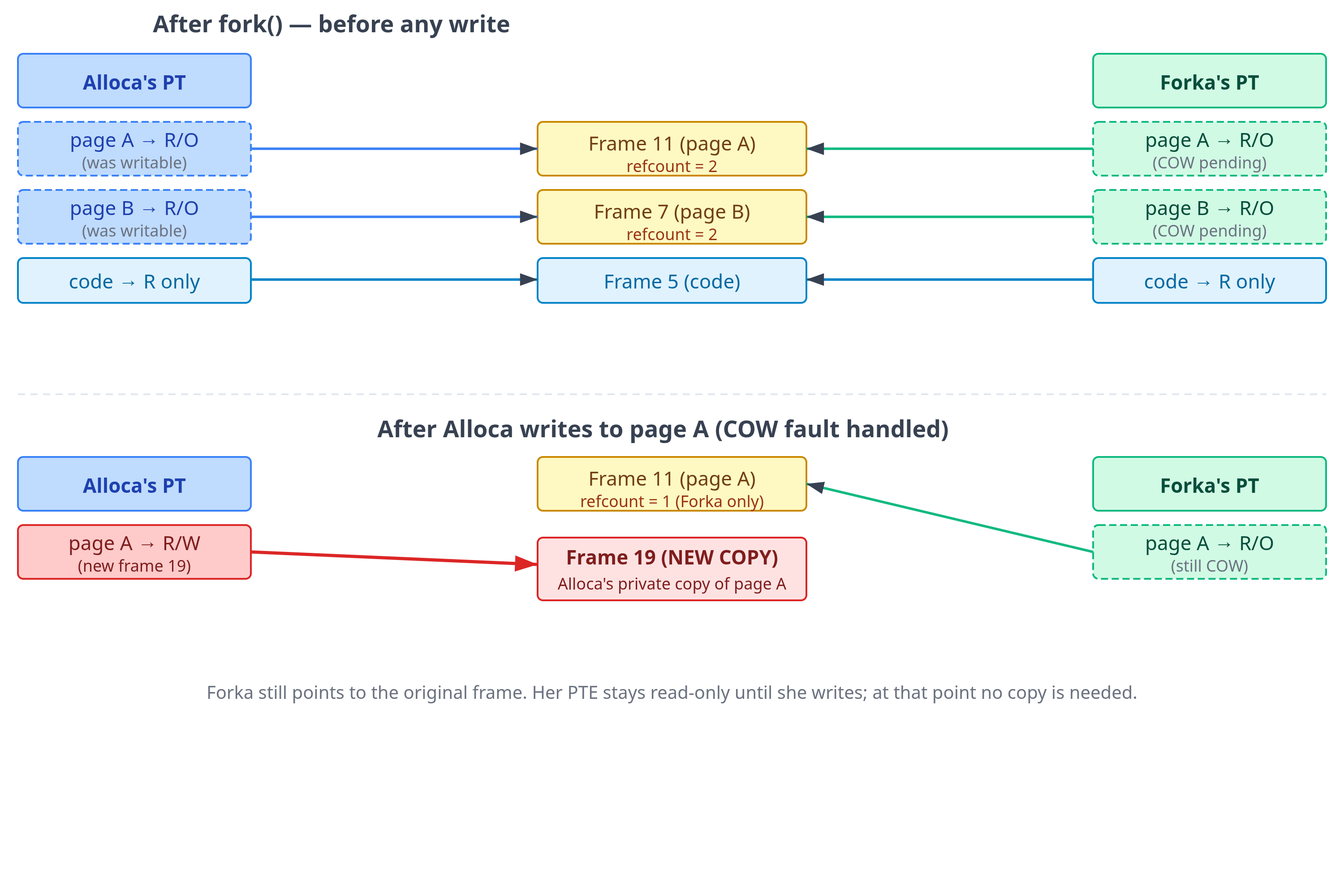
fork(). Initially, both page tables point to the same physical frames (top). After Alloca writes to page A, the kernel allocates a new frame (19), copies the contents, and updates only Alloca’s PTE to point to the new frame. Forka’s PTE still points to the original frame and remains read-only; the kernel will restore write permission on Forka’s next write fault without needing to copy, because the frame is no longer shared.Aside: fork + exec: why process creation is cheap
A common Unix pattern is to call fork immediately followed by exec to load and execute a new program. exec discards the child’s entire address space and builds a fresh one for the new program. For example, this is how the shell works whenever you execute a command.
For this reason fork needs to be cheap and one way to achieve that is by avoiding the copying of parent’s memory pages until it is really needed.
Key Takeaway
fork() creates a new process (the child) that is an exact copy of the parent at the moment of the call. Naively, this would require copying every byte of the parent’s virtual memory, a multi-gigabyte operation for large processes. Copy-on-write (COW) makes fork() efficient by deferring that copy until it is actually necessary.
When fork() is called:
The kernel allocates a new process descriptor for the child.
The kernel creates a new set of page tables for the child, initially pointing to the same physical frames as the parent.
For every private writable mapping, the kernel marks the entry as read-only in both parent and child. Read-only pages (code) are shared as-is, they were already protected.
The kernel tracks reference and mapping state for each physical frame. After a fork, private pages that were writable in the parent are now mapped by both processes, so their state records that they are shared.
When either process subsequently writes to a COW-protected page, the MMU detects a write to a read-only PTE and raises a protection fault. The kernel’s COW handler:
Checks whether the page is still shared. If it is, a copy is needed. If the kernel can determine the faulting process is now the only relevant owner, it can simply restore write permission without copying.
If a copy is needed: allocates a new frame, copies the contents, updates the faulting process’s PTE to point to the new frame with write permission. The other process’s PTE is left pointing to the original frame, still read-only.
Memory-Mapped Files
Several cycles pass. Alloca is trying to analyze a large log file. She has been doing it the obvious way, calling read() in a loop, filling a buffer, processing the buffer, repeat. Kernel notices this and wanders over.
Kernel: “You know there’s a better way to do that.”
Alloca: “I’m reading a file. What better way is there?”
Kernel: “Instead of reading into a buffer, let me map the file directly into your address space. You access it like regular memory: just use a pointer, and I’ll handle getting the data to you.”
Alloca: “You mean I can read a file with a pointer? No
read()calls at all?”Kernel: “Exactly. Call
mmap(). Give me the file descriptor, the length, and some flags. I’ll create a new VMA in your address space (a memory-mapped region). Then you can read from or write to addresses in that region just like regular memory, and I’ll give you the file’s contents.”Alloca does it. She gets back an address,
0x7f4b00000000. She reaches out to read the first byte at that address.And the pause happens again. A little longer this time.
Alloca: “Longer pause. What was that?”
Kernel: “A major page fault. When you called
mmap(), I didn’t actually load any of the file data into memory. That file could be gigabytes in size, and I have no idea which parts you’ll actually access. So I just created a VMA for that address range and left the page table entries absent. The first time you accessed that page, the MMU found present=0, trapped to me, and I had to read it from disk.”Alloca: “So mmap is also lazy?”
Kernel: “That’s right. Demand paging works for files too. Now, notice where I put the data after reading it from the disk.”
Alloca: “Where?”
Kernel: “In the page cache. This is a pool of physical frames I use to cache file data. When a file page is read (whether via
read()ormmap()), it lands in the page cache. For your mmap access, once the data was in the page cache, I installed a page table entry pointing directly to that page cache frame. Your virtual address now directly maps to the physical frame that holds the file data.”
Aside: The page cache is not reserved memory
A common misconception is that the page cache is a reserved pool of memory, it’s not. It is simply the set of physical frames that the kernel is currently using to hold file data. When an application needs more memory and there are no free frames, the kernel can reclaim clean page-cache frames instantly, because the file on disk is already the backing copy. This is why a system that looks nearly full of “used” memory can still allocate freely: much of that “used” memory is reclaimable cache, not locked-in application data.
Alloca: “So I’m reading the file’s data directly from the page cache, through my page table?”
Kernel: “Yes. No intermediate user-space buffer copy. Now compare that to what happens when you use
read()instead. I still bring the file data into the page cache, usually by DMA from the storage device into memory. But thenread()copies the data from the page cache frame into your user-space buffer. That page-cache-to-user-buffer copy is the extra step thatmmap()avoids.”
Aside: What is DMA (Direct Memory Access)?
Normally, when a CPU wants data from a storage device or network card, it would have to sit in a loop reading bytes, which is an expensive waste of cycles. DMA is a hardware mechanism that lets peripheral devices transfer data directly into main memory (RAM) without CPU involvement.
In this scheme, the kernel and device driver submit an I/O request that describes the target memory pages and the storage range. The storage controller uses DMA to transfer data directly into those pages and interrupts the CPU when the transfer is done. The CPU is free to do other work the entire time.
Alloca: “And
mmap()avoids that second copy because I access the data directly through the mapped address. But what happens if you evict the page cache frame while it’s mapped?”Kernel: “Before I can reclaim that frame, I first remove the page table entry pointing to it. The VMA remains intact, so the next time you access that address the MMU finds no mapping, faults, and I reload the data. From your perspective the mapping is seamless; you never hold a dangling pointer.”
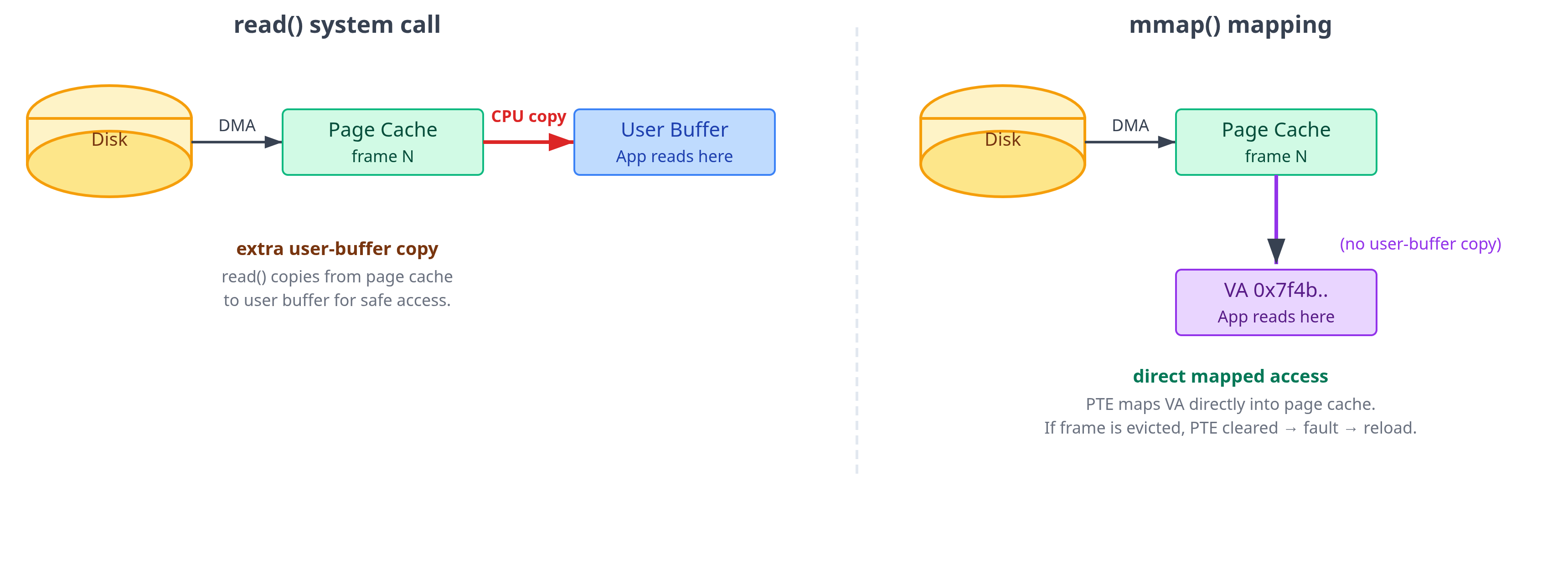
read() vs. mmap() I/O paths. With read(), data is brought from disk into the page cache and then copied into the process’s user-space buffer. With mmap(), the process’s PTE points directly into the page cache, eliminating that page-cache-to-user-buffer copy. The trade-off is that mmap() pays through page faults and page-table management instead of explicit read calls.Alloca: “So should I always use
mmap()for file I/O? Avoiding that user-buffer copy sounds like an obvious win.”Kernel: “Not always.
mmap()removes one cost, but it introduces others. It trades explicit I/O and copying for page faults, page tables, TLB pressure, and different failure modes. Whether that trade is good depends on the access pattern.”
Aside: mmap() is not automatically faster
The first access to a cold mapped page is still a page fault. The fault enters the kernel, locates the VMA, finds or reads the page cache page, installs a PTE, and resumes the faulting instruction. If you scan a huge file once, you may take one fault per 4 KB page, and those faults can dominate the page-cache-to-user-buffer copy you avoided.
read() and mmap() also expose different shapes of work. With read(), user space usually asks for a large buffer at a time, maybe 64 KB, 256 KB, or more. The kernel copies a contiguous chunk into that buffer and can issue readahead based on the file access pattern. With mmap(), readahead can happen too: when a fault reveals sequential access, the kernel may read surrounding file pages into the page cache, and may map nearby already-cached pages around the fault. But the control flow is still implicit and fault-driven. Cold pages still need faults to install mappings.
Mappings also consume page table memory, create TLB pressure, and may trigger TLB shootdowns when unmapped or when permissions change. Error handling is different too: if another process truncates a mapped file and you later touch a page beyond the new end, the kernel may deliver SIGBUS. With read(), you usually see an error return or a short read instead.
So mmap() is often attractive when access is random, repeated, shared across processes, or naturally pointer-based. read() is often competitive or better for simple sequential streaming, especially with large buffers. “Zero-copy” is not the same as “free”; the only reliable answer for performance-sensitive code is to measure the actual workload.
At that moment, Forka wanders over. She too needs to read the same log file.
Forka: “I’m going to mmap that same file. Same one you’re using, Alloca.”
Forka calls mmap(). She accesses the same page Alloca just read. But this time there is no pause.
Forka: “That was fast. Why no pause this time?”
Kernel: “Because that page is already in the page cache, it was loaded when Alloca accessed it. I just gave your page table an entry pointing to the same physical frame. You’re both reading from the same physical bytes. No disk I/O. No copy. Nothing moved.”
Alloca: “Wait, we’re both pointing at the same physical frame? So if I write to my mapped region, does Forka see it?”
Kernel: “That depends on a flag you passed to
mmap(). WithMAP_SHARED, your write goes directly into the shared page cache frame, so yes, Forka sees it. WithMAP_PRIVATE, your write triggers a COW fault and you get a private copy, same as afterfork(). The file is never touched.”Alloca: “And if I use
MAP_SHARED, when does the change actually reach disk?”Kernel: “It happens asynchronously. But, if you need to guarantee it has been written to disk, you call msync() or fsync().”
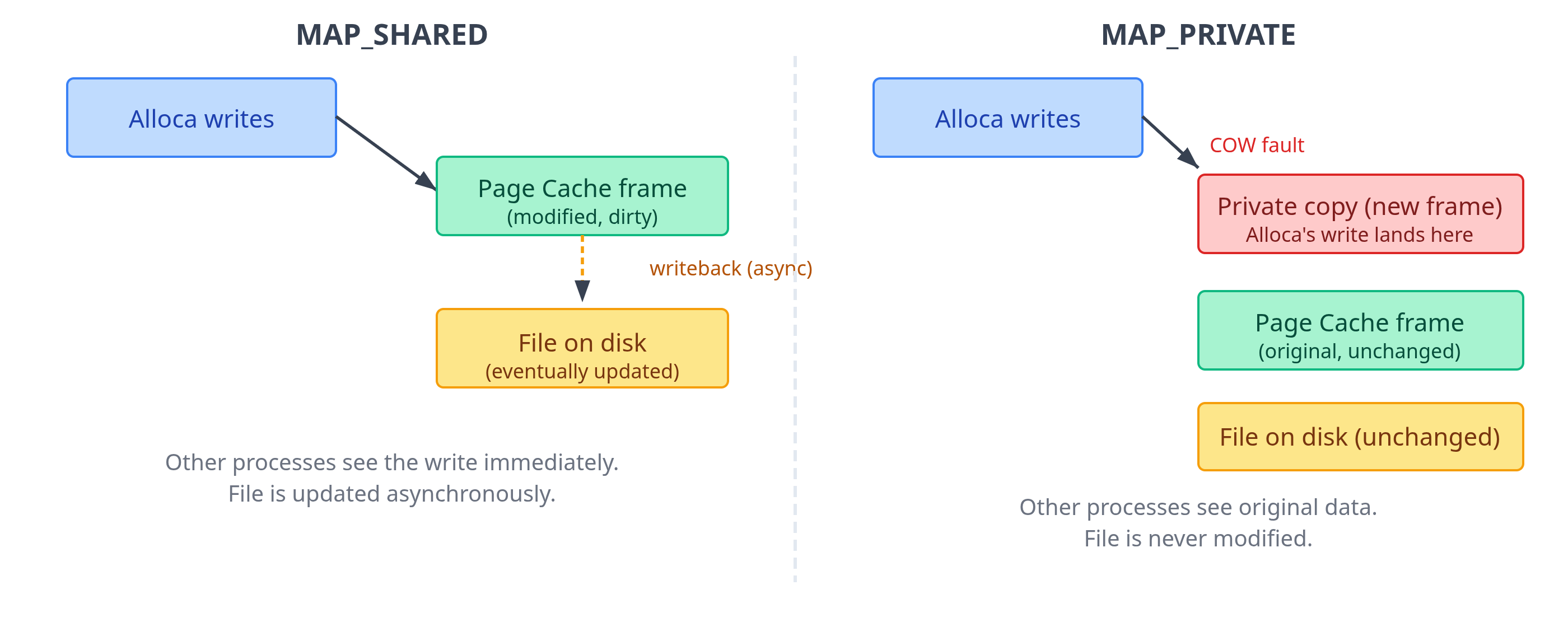
MAP_SHARED vs. MAP_PRIVATE write semantics. With MAP_SHARED, writes go into the shared page cache and are flushed to disk asynchronously. With MAP_PRIVATE, the first write triggers a COW fault; the process gets a private copy that diverges from both the file and other processes.Key Takeaway
mmap() is a system call that can be used to map a range of bytes from a file directly into a process’s virtual address space, creating a new VMA backed by the file. Subsequent reads and writes to that virtual address range behave exactly like memory accesses: the kernel’s page fault machinery handles loading data from disk on demand.
The central abstraction is the page cache: a kernel-managed pool of physical frames that holds recently accessed file pages. In the normal buffered-I/O path, file access via read(), write(), and mmap() goes through the page cache. The difference is how user space reaches those bytes:

The reason read() copies into a user buffer is ownership. The caller receives bytes placed in memory it fully controls. Once the call returns, the kernel can evict or reuse the underlying page cache page without affecting the caller’s data.
With mmap(), the kernel abstracts away the complexities of memory through the page table: if a mapped page is evicted, the PTE is marked absent, the next access faults, and the kernel reloads the data transparently.
Aside: Bypassing the page cache using direct I/O
By default, ordinary read(), write(), and mmap() file access go through the page cache. File data gets cached in kernel-managed page cache first, and either gets copied to a user buffer (read()), copied from a user buffer (write()), or mapped directly into the process (mmap()). This is buffered I/O, and it is the normal path.
There is another option: open a file with O_DIRECT. This asks the kernel to transfer file data directly between the storage stack and your user-space buffer, bypassing the normal page-cache data path. This sounds appealing for cases when you want to avoid kernel managed page-cache and have a caching layer in the application itself. But it comes with its own constraints. The buffer address, I/O length, and file offset often need to satisfy filesystem/device alignment requirements, commonly 512 bytes or 4 KB, though the exact rules vary.
The reason anyone uses O_DIRECT is control. Database engines are a famous example that commonly use this. These systems do sequential scan of data while processing queries. When using buffered I/O, the page cache gets filled with intermediate data that the database engine is not going to need in the near future, but this may result in the eviction of the useful pages the database may need soon. To gain control of over this, databases implement their own buffer pools in user space, and disable the use of page cache via direct I/O.
The tradeoff with using direct I/O is that you bypass the page-cache machinery that normally provides readahead, dirty-page buffering/writeback, and shared cached file pages between processes. You are now responsible for your own buffering, I/O sizing, alignment, and scheduling strategy. For most applications, buffered I/O is the right choice. O_DIRECT is a tool for workloads that already implement their own caching and need tighter control over the kernel’s caching behavior.
Anonymous, File-Backed, and Shared Memory
Alloca now understands that some pages come from files and some pages come from nowhere at all, beginning life as zero-filled frames. But she is still missing a vocabulary for the different kinds of memory she has been using.
Alloca: “I keep hearing different names for memory: anonymous memory, file-backed memory, shared memory. Are these different mechanisms, or just different names for pages?”
Kernel: “They are categories of mappings. Let me explain this to you systematically.”
Alloca: “Sure!”
Kernel: “By now you must have understood that VMA is a key structure behind how I manage virtual memory. Now, every VMA tells me two things about the mappings: where does the data come from, and who can observe writes to it?”
Alloca: “Let’s start with where the data comes from.”
Kernel: “There are two possibilities. The data can either come from a file, like when you
mmapa file, and that results in what I call as file-backed mappings. The second possibility is that the data is from anonymous memory with no file backing it. For example, your heap and your stack regions are anonymous. You can allocate anonymous memory usingmmapas well by using theMAP_ANONYMOUSflag.”Alloca: “Understood. What is the second thing the VMA tells you?”
Kernel: “It tells me about who can observe writes to that mapping. A mapping can be private or shared. With a private mapping, your writes are yours alone. If the mapping began from a file, your first write usually triggers copy-on-write and creates an anonymous private page. The file is unchanged. With a shared mapping, multiple processes can map the same underlying object and observe each other’s writes through those mappings.”
Alloca: “So file-backed versus anonymous tells us where the contents come from, and private versus shared tells us who sees writes.”
Kernel: “Exactly.”
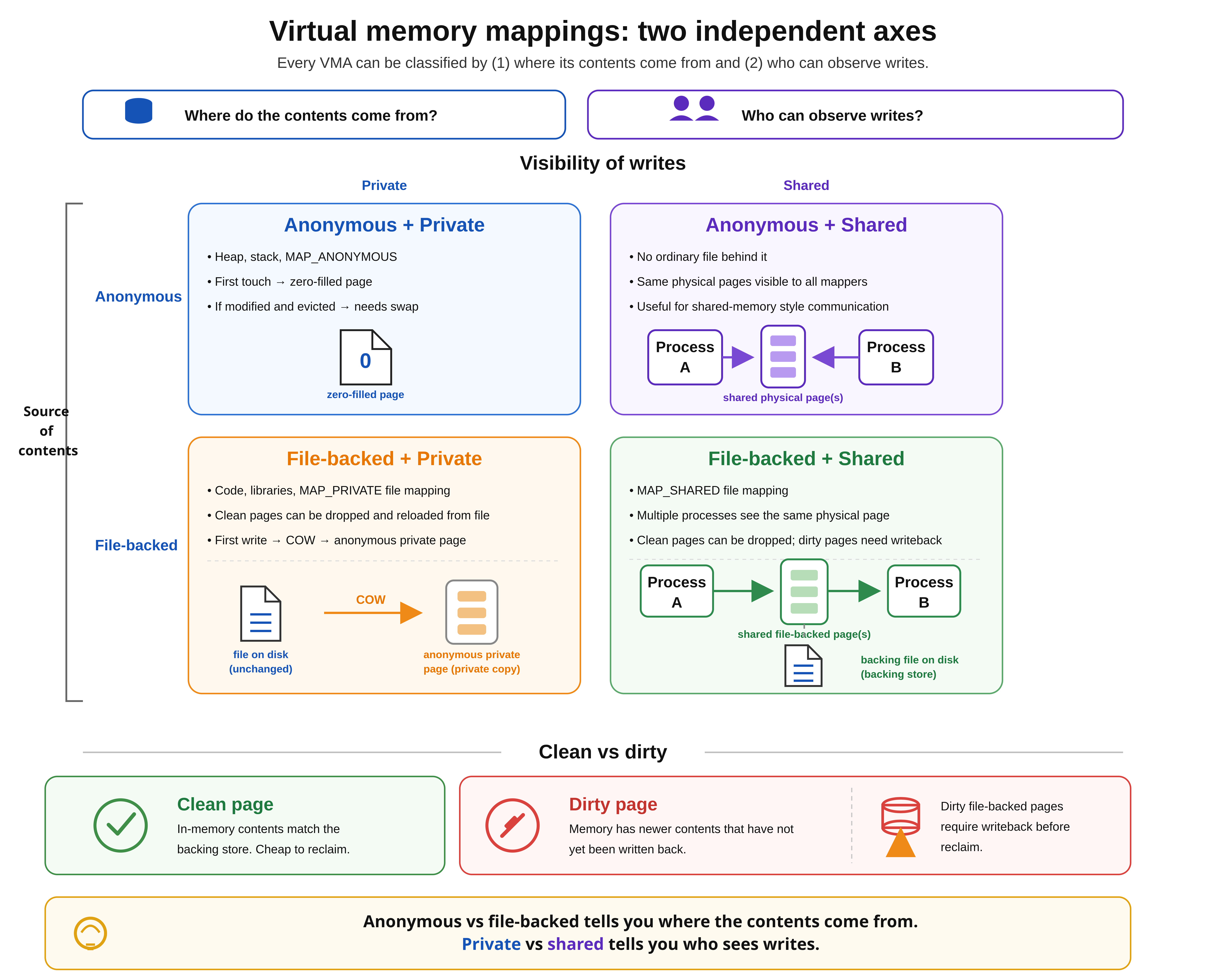
Key Takeaway
Virtual memory mappings can be classified along two axes:
Anonymous memory: Memory with no ordinary file behind it. Heap, stack, and
MAP_ANONYMOUSmappings are common examples. New anonymous pages are zero-filled on first touch. If modified anonymous pages must be evicted, they need swap because there is no file to reload them from.File-backed memory: Memory whose contents come from a file. Executable code, shared libraries, and file mappings are examples. Clean file-backed pages can be dropped and later reloaded from the file. Dirty file-backed pages must be written back before reclaim.
Private mappings: Writes are private to the process. A private file mapping can initially share clean file pages, but the first write creates an anonymous copy through COW.
Shared mappings: Writes are visible to other processes mapping the same object.
MAP_SHAREDand POSIX shared memory use this model.
Aside: tmpfs: the file-anonymous hybrid
“Shared memory” as people commonly use the term (POSIX shared memory via shm_open, System V shared memory, /dev/shm) is a distinct concept from the shared mapping we just discussed. A shared mapping is simply one where writes are visible to other mappers. These shared memory APIs are higher-level mechanisms built on top of that idea; under the hood, they are typically backed by tmpfs.
tmpfs is a filesystem whose contents live entirely in memory and swap rather than on a persistent disk. A tmpfs file looks and behaves like an ordinary file: you can open(), mmap(), or fstat() it, but there is no disk backing it. If the system reboots, the contents are gone.
From a reclaim perspective, tmpfs pages behave more like anonymous memory than disk-backed file cache: they have no persistent disk file to reload from, so evicted dirty tmpfs pages go to swap. Internally, they still live in the page cache and are managed through the VFS like ordinary files, which is what makes the familiar file API work. This makes tmpfs useful as a fast inter-process communication channel: two processes can map the same file from /dev/shm with MAP_SHARED and share the same physical frames, while still using the ordinary file API.
Page Reclaim: How the Kernel Chooses What to Evict
Alloca has now seen swap and file-backed mappings, but she has only been told the simple version: when memory runs out, the kernel evicts something old. She wants to know how that choice is made.
Alloca: “When physical memory fills up, you said you pick a page that hasn’t been accessed recently. But how do you know that a page hasn’t been used in the recent past?”
Kernel: “I maintain a list of physical frames organized by how recently they appear to have been used. These are the LRU lists (least recently used). I simply scan these lists, starting from the coldest end and find a candidate page that can be evicted.”
Alloca: “But the question remains: how are these lists created and updated? Do you monitor each memory access to continuously update these lists?”
Kernel: “Watching every access in software would be impossibly expensive. So I rely on hardware’s help. Every page table entry has an accessed bit, which is there to indicate if a page was accessed. When the MMU performs a page table walk and uses a PTE to translate an address, it sets that bit automatically in that PTE. I don’t have to trap the access, I just come along later and look at what the hardware recorded.”
Alloca: “How does that work in practice? The MMU is setting the accessed bit in the page table entries, but you need to maintain and update LRU lists of frames. Do you actively go through all the page table entries of all processes and update the LRU lists?”
Kernel: “That would be just as expensive. Imagine iterating every virtual page of every running process on every reclaim cycle, you’d spend more time on bookkeeping than anything else. I take the opposite approach. I scan the LRU list from the coldest end, check the page table entries mapping to it and see if the accessed bit is set or not.”
Alloca: “How do you find out which PTEs map to a frame?”
Kernel: “That’s where reverse mappings come in, usually called rmap. The page table is a forward map: virtual address → physical frame. I also maintain the reverse: metadata attached to each physical frame that lets me find the VMAs and page table entries that currently map it. When I want to check whether a frame is warm, I follow its rmap to the relevant PTEs, and check the accessed bits.”
Alloca: “Ah, I was not aware that you also maintain reverse mappings. But I still don’t understand how all of this works together? You’ve given me pieces of the puzzle but the full picture is not clear.”
Kernel: “The confusion is understandable. Let’s connect everything together. When I have to reclaim memory, I start by scanning the coldest set of frames from the LRU list. Then I use the rmap to check the accessed bit of the pages mapping to those frames. If a frame’s accessed bit is not set, then it is a candidate for reclaim.”
Alloca: “And what if the accessed bit was set?”
Kernel: “Then things become interesting. If a frame’s accessed bit is set, it could mean that it has been accessed tens or hundreds of times, but it could also mean that it was accessed once since then it has gone cold. So, for such frames, I unset their accessed bit to give them a second chance. If the frame is scanned again later and the bit is still clear, then that is stronger evidence that it has gone cold.”
Aside: The kswapd daemon
Normally, Linux runs a background thread called kswapd that watches free-memory watermarks. When free memory drops below a threshold, kswapd wakes up and starts reclaiming pages before the situation becomes urgent.
If background reclaim cannot keep up, the allocating process may have to wait for reclaim. This is called direct reclaim, and it can show up as allocation latency in the application.
Alloca: “And, how are the LRU lists structured? You said you start from the coldest end, how do pages age toward that end?”
Kernel: “Although things are a bit more complex, I will simplify for you. Think of two lists: active and inactive, each having a head (newest) and a tail (oldest). When a new page is faulted in, it typically starts near the head of the inactive list. Over time, pages age toward the tail as newer pages push them back, or when colder pages get reclaimed.”
Alloca: “But if all the newly faulted pages start from the head of the inactive list, how does a page get promoted to the active list?”
Kernel: “A page that consistently shows its accessed bit set across multiple reclaim scans is promoted to the active list because it has demonstrated sustained use. From there, it ages toward the active tail again. When the active list grows too large, its tail pages are demoted back to the head of the inactive list. So the flow is: inactive tail is where eviction happens, active tail is where demotion back to inactive happens. Pages circulate through this cycle, and only those that consistently fail to show any access get evicted.”
Aside: Multigenerational LRU (MGLRU)
The active/inactive model works, but two buckets is a coarse instrument. The fundamental limitation is that it preserves only coarse aging information: it can tell that a page looked recently referenced at scan time, but it does not maintain a rich multi-step history of how its temperature changed over time. A page accessed ten thousand times since promotion looks effectively the same as one accessed once; a page that was hot for ages but cooled recently looks the same as one that was never warm. Under workloads with mixed access frequencies, periodic re-access patterns, or bursty I/O, this can lead to evicting pages that will soon be needed or retaining pages that will not.
MGLRU (multi-generational LRU) addresses the root cause by giving the kernel more expressive age information. Instead of two lists, pages are grouped into several generations, each representing a time window of access activity. Pages start in the youngest generation when first faulted or accessed. Without re-access they age into older generations; with re-access they are refreshed back into a younger one. Reclaim always targets the oldest generation first. With more age buckets, the cooling curve of a page becomes observable over time, allowing the kernel to make finer, more informed eviction decisions.
MGLRU was introduced in Linux 6.1. The build config option CONFIG_LRU_GEN=y includes the code and CONFIG_LRU_GEN_ENABLED=y enables it by default. When compiled in, /sys/kernel/mm/lru_gen/enabled controls it at runtime. Systems without it fall back to the classic active/inactive lists.
Alloca: “So the lists tell you which pages are cold. But once you’ve found a cold page, does it matter what kind of page it is? Is every cold page equally easy to evict?”
Kernel: “Not at all. The first split is file-backed versus anonymous. Clean file-backed pages are the easiest. If a page cache page matches the file on disk, I can drop it immediately and reuse the frame. The next access will fault and read it back from the file.”
Alloca: “What about dirty file-backed pages?”
Kernel: “Those need writeback. If a process wrote through
write()orMAP_SHARED, the page cache page may be dirty. Before I can reclaim that frame, I need to schedule I/O to write the contents back to the filesystem. After writeback completes, the page becomes clean and cheap to drop. AMAP_PRIVATEwrite is different: the first write produces a private anonymous copy via COW. That copy has no file behind it, so there is no persistent home to reload from. To reclaim it safely I must write it to swap, same as any other anonymous page with real data in it.”Alloca: “So under memory pressure, file cache tends to be easier to reclaim than heap memory.”
Kernel: “Often, yes, especially clean file cache. This is why free memory can look low while the system is healthy: much of RAM may be used as page cache, and clean cache can be reclaimed quickly when applications need memory. The dangerous case is when the active working sets of processes exceed RAM. Then I have to reclaim pages that will soon be needed again, and the system can start thrashing.”
Alloca: “Thrashing means constantly evicting and faulting the same pages back in?”
Kernel: “Right. The CPU spends more time waiting for page faults and disk I/O than doing useful work. At that point, virtual memory’s illusion of abundant memory has become too expensive to maintain.”
Key Takeaway
Page reclaim is the kernel’s mechanism for freeing physical frames under memory pressure. It is approximate, not perfect LRU. Two complementary mechanisms make it practical without being prohibitively expensive:
Accessed bits: Every page table entry has a hardware-maintained accessed bit that the MMU sets automatically when the CPU uses that mapping. The kernel reads and clears these bits periodically to estimate recency without trapping every memory access.
Reverse mappings (rmap): The page table is a forward map (virtual → physical). The kernel also maintains the reverse: metadata on each physical frame that lets it find the VMAs and page table entries that map it. Reclaim uses rmap to check accessed bits on candidate frames only, without scanning every process’s page table. This means reclaim starts from lists of physical frames, not from virtual address spaces, so the cost scales with the number of frames under consideration, not with the total size of all processes’ virtual memory.
Active/inactive LRU: Pages move between active and inactive lists. In Linux, these are split further into anonymous and file-backed LRUs, maintained per memory-management domain. New pages generally enter as inactive candidates. Pages age toward the tail as newer pages arrive. Reclaim scans from the tail of inactive, checking accessed bits via rmap for mapped pages:
Accessed bit set means that the page was recently used; clear the bit to give it a reprieve.
Accessed bit clear means that the page is cold; evict it.
Pages that are consistently accessed get promoted to the active list. When the active list grows too large, its tail pages are demoted back to the head of inactive. Pages cycle through this until they consistently fail to show any access.
MGLRU (multi-generational LRU) extends this with several age generations instead of two lists, allowing finer-grained decisions about what is truly cold.
The reclaim cost also depends heavily on page type:
Clean file-backed page: cheapest. Drop it immediately; a future access reloads from the file.
Dirty file-backed page: must be written back to storage before the frame can be reused.
Anonymous page with private data: generally needs swap before reclaim, because there is no file to reload it from. Without swap configured, ordinary anonymous pages are much harder to reclaim.
The practical consequence: “used memory” is not automatically bad. The RAM used for clean page cache is readily reclaimable. However, the real danger is when the combined hot working set of applications exceeds RAM, forcing the kernel to evict pages that will soon be needed again, causing thrashing.
Memory Access Patterns and VM Performance
Alloca has been running correctly for some time now. Her pages are backed, her TLB is warm, and demand paging has handled everything smoothly. But lately she’s noticed something odd: she has two data structures (a dense array and a hash table), each holding the same amount of data, both fitting entirely in RAM. When she scans through all elements in each, the array finishes in seconds. The hash table takes ten times longer.
Alloca: “Same amount of data. Both in RAM. Page table entries for both are installed. Why is the hash table so much slower?”
Kernel: “Because the virtual address space makes all memory look equally fast. It isn’t. The cost of an access depends on how it interacts with the layers underneath: the TLB, the cache, the physical layout.”
Alloca: “Tell me what’s different.”
Kernel: “When you scan the array, you move through virtual addresses in order. If the first element is at address
0x1000, and each element is 4 bytes, then the next is at0x1004, then0x1008, and so on. You stay within one 4 KB page for over a thousand consecutive accesses. Remember, the TLB caches completed virtual-to-physical translations, one entry per page. All those accesses within the same page reuse the same TLB entry, so they are fast. Then you cross into the next page and need one new entry. Only a small sliding window of TLB entries is active at any moment, and you reuse each one extensively before moving on. The TLB handles that easily.”Alloca: “And with the hash table? I’m probing at random locations across the whole allocation.”
Kernel: “Yes, that’s where the problem is. Hash table probes are spread across the entire allocation with no fixed order. You might touch page 47, then page 3, then page 201. The CPU has a limited hierarchy of TLBs, a small L1 TLB and a slightly larger second-level TLB. Together they may cover hundreds to a few thousand page translations depending on the CPU and page size. As your probe set fans out across many pages, the TLB hierarchy fills up. When it’s full, a new translation evicts an old one. The trouble is that with no locality in your access pattern, the evicted translation is often the one you’ll need again soon. By the time you revisit a page, its translation is likely gone, and the hardware may have to walk the page table again to rebuild it.”
Alloca: “So if a translation misses across the TLB hierarchy, the hardware has to do a page walk before I can even access the data?”
Kernel: “Right. For random access across a large range, you can be spending significant overhead on translation for every byte you actually wanted. And TLB pressure isn’t the only thing working against you. There’s also the hardware prefetcher. When you access virtual addresses in a predictable pattern, the CPU detects it and starts fetching upcoming cache lines before you ask for them. For your array scan, you’re reading
0x1000,0x1004,0x1008in sequence, so the prefetcher loads the next cache lines ahead of time.”Alloca: “But what if the next address crosses into the next virtual page?”
Kernel: “Usually the hardware prefetchers are conservative around 4 KB page boundaries because crossing into the next page could cause a page fault or run into permission issues.”
Alloca: “Understood. Each array page holds over a thousand elements. So the prefetcher helps throughout each page, and the cost of crossing into the next is just one TLB lookup?”
Kernel: “Correct. For your hash table, the random probes defeat the prefetcher even within a single page because there’s no predictable pattern to detect. So the array wins twice: fewer distinct TLB entries needed, and hardware prefetching next set of cachelines.”
Alloca: “Is there anything else that affects this?”
Kernel: “Yes, how often you revisit the same pages. If you keep accessing the same set of pages over and over, those pages stay hot. Their TLB entries stay cached, so you’re not constantly rebuilding translations. And those physical frames stay in RAM because my reclaim policy notices they’re being used frequently. I’m less likely to evict a page that’s getting hammered than one that hasn’t been touched in a while.”
Alloca: “So if my working set is small enough to fit in the TLB and I keep reusing it, I’m golden?”
Kernel: “Exactly. A tight working set is cheap. But if your working set is sprawling across hundreds of thousands of pages that you only touch occasionally, you’re constantly evicting TLB entries you’ll need again soon. And under memory pressure, those infrequently-accessed pages become candidates for eviction to swap. Then you’re not just paying for TLB misses, you’re paying for disk I/O to bring pages back from swap.”
Alloca: “So the key is to touch fewer pages. Is there anything I can do to control this?”
Kernel: “Absolutely. One thing that’s often overlooked is how tightly you pack your data. The virtual memory system operates at page granularity, so anything that helps you fit more useful data into each page reduces the number of pages, translations, and TLB entries needed for the same logical work.”
Aside: Data layout also changes TLB footprint
Compilers often pad structs to satisfy alignment requirements, but struct padding is not just a local layout detail. It also affects how much memory an array of those structs occupies, and therefore how many cache lines and pages the program touches.
Suppose you have a struct with a char, then an 8-byte pointer, then another char. On a typical 64-bit system, the compiler may insert padding after the first char to align the pointer, and then more padding at the end so that each element in an array keeps the pointer correctly aligned. The result may be 24 bytes per struct, even though the actual fields occupy only 10 bytes.
Across a million elements, that difference matters. A 24-byte layout occupies about 24 MB, while a more compact reordered layout may occupy about 16 MB. With 4 KB pages, the larger layout spans more pages. More pages means more TLB entries are needed to cover the same number of logical objects, more page-table walks when the TLB misses, and more memory that the kernel may have to manage under pressure.
One common way to reduce padding is to order fields from larger alignment requirements to smaller ones: 8-byte fields first, then 4-byte fields, then 2-byte fields, then 1-byte fields. The compiler may still add tail padding, but usually less than when different-sized fields are interleaved randomly.
Key Takeaway
Virtual memory makes all addresses look the same, but they’re not. The CPU has a limited TLB hierarchy, with small L1 TLBs backed by larger second-level TLBs. Together, they cover a limited number of translations, typically a few hundred to a few thousand, depending on the CPU and page size. Once your working set spans more pages than the TLB hierarchy can cover, translation misses become more common. Misses that hit in the second-level TLB are cheaper, but misses that require a hardware page walk can be expensive.
How you access memory matters a lot. If you walk through an array sequentially, you stay within a small number of pages at any given time. You reuse the same TLB entries for thousands of accesses before moving to the next page. The hardware prefetcher can see the pattern and load upcoming data into cache before you ask for it (at least until you hit a page boundary, where it has to stop). That’s why sequential scans are fast.
Random access is a different story. When you jump around unpredictably, like probing a hash table, or chasing linked list pointers, you may land on different pages very frequently. As a result, you may face TLB misses for pages that are being visited for the first time, and also you risk evicting TLB entries you’ll need again soon. The prefetcher can’t predict where you’re going next, so it doesn’t help. In the worst case scenario, every access risks a TLB miss and a page walk.
Temporal locality matters too. If you keep revisiting the same pages, they stay hot. Their translations stay cached in the TLB. The kernel is less likely to reclaim frequently used pages, because they tend to be recognized as part of the active working set. Under severe pressure, though, even useful pages can still be reclaimed. But if your working set is sprawling and you rarely touch the same page twice, you’re constantly rebuilding translations and building up memory pressure.
How you pack your data affects how many pages you touch. A poorly-designed struct with lots of padding might be twice the size of a well-packed one. If you have an array of a million structs, that can result in a difference of 6000 vs 3000 pages. Same logical work, but one version fits in the TLB and the other thrashes. Every byte you save per element multiplies across the whole working set: fewer cache lines, fewer pages, fewer translations, fewer page walks, and less memory pressure.
The VM machinery works largely at page granularity while caches operate at cache-line granularity. Performance-conscious code thinks about how data is laid out in both cache lines and pages, how those pages fit in the TLB, and how access patterns interact with the translation machinery.
Huge Pages and TLB Efficiency
Alloca has redesigned her hash table. Better hash function, reduced load factor. She accepts that random access is unavoidable. But she is still spending too much time on TLB misses. For a 2 GB table with 4 KB pages, the math is unforgiving: half a million pages, and no TLB holds that many entries.
Alloca: “I understand the TLB problem. My 2 GB table spans half a million 4 KB pages. The TLB can only hold a limited number of translations. I will always be missing. What can I do besides shrinking the data?”
Kernel: “You can change the page size. The TLB has a fixed capacity, you can’t change it. But what you can change is how much memory each entry covers. x86-64 supports huge pages with sizes 2 MB, and on many systems 1 GB pages as well. A single 2 MB TLB entry covers 512 times as much memory as a 4 KB entry. So your 2 GB hash table mapped with 2 MB pages needs only 1,024 TLB entries instead of half a million”
Alloca: “That is dramatically fewer. But, how does this work with the page table hierarchy?”
Kernel: “The page table walk has an early-exit mechanism when you use huge pages. Each page table entry has a set of flags embedded in its low bits. One of those flags is the page-size bit (PS) which tells the hardware: ‘stop here, this entry points directly at a physical frame, not at another table.’ For a normal 4 KB mapping, the PMD entry points to a PTE table, and the walk continues. But when the PS bit is set on the PMD entry instead, the hardware treats the PMD entry itself as the final frame mapping, covering 2 MB at once. It skips the PTE level entirely. The 21 low-order bits of the virtual address become the offset within the 2 MB frame instead of requiring a further table lookup. Similarly, if the PS bit is set on a PUD entry, the hardware stops there and maps 1 GB directly, skipping both the PMD and PTE levels.”
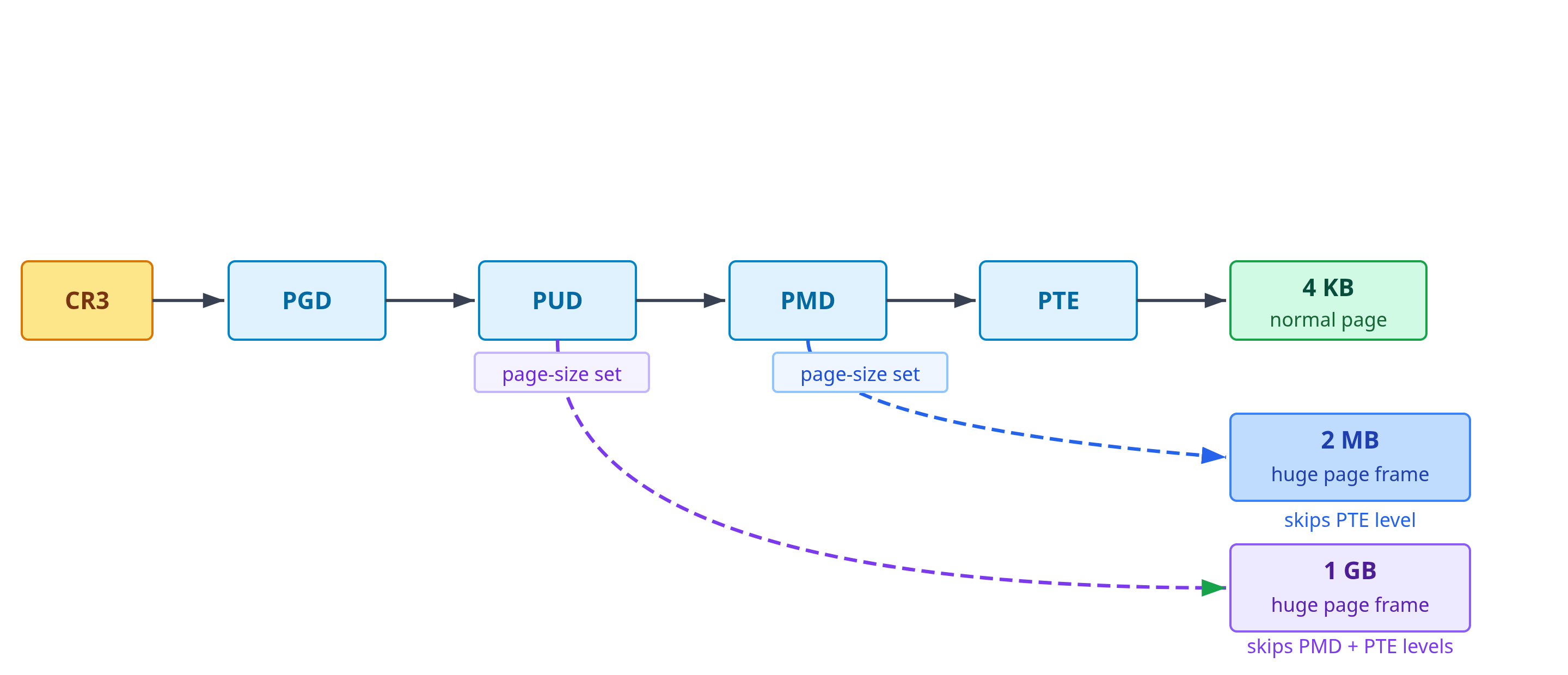
Alloca: “Fewer levels in the walk, fewer TLB entries needed. What is the catch?”
Kernel: “Physical contiguity. A 2 MB huge page needs 512 physically contiguous 4 KB frames, and the starting address has to be aligned to a 2 MB boundary. For a regular 4 KB page, I can grab any single free frame from anywhere in physical memory. It’s easy. But for a huge page, I need to find a 2 MB-aligned block where all 512 frames are sitting right next to each other, and they all have to be free at the same time. After the system has been running for a while, physical memory gets fragmented. Small allocations come and go, leaving little gaps everywhere. Finding a big contiguous block with the right alignment gets harder and harder. I can try compaction, where I migrate pages around to assemble larger free ranges, but there’s no guarantee it’ll work.”
Alloca: “So huge pages are generally easier to get on a fresh system and harder as long-running workloads fragment memory?”
Kernel: “That’s the usual pattern, yes. So how do you get them reliably? One answer is to reserve a pool upfront, ideally at boot before memory has had a chance to fragment. You set
vm.nr_hugepages, I carve out that many huge pages and hold them aside. They’re always contiguous, always aligned, always ready. When you ask for one, I hand it out instantly. The catch: that memory stays off-limits for anything else for as long as it’s in the pool, even when nothing is using it.”Alloca: “And if I don’t want to lock memory away like that?”
Kernel: “That’s where Transparent Huge Pages, or THP, comes in. THP tries to give you huge pages without a dedicated pool. Sometimes I can allocate one directly when you first fault a region. Other times, a background daemon called
khugepagedscans your anonymous mappings and collapses a 2 MB-aligned range of base pages into a single huge page after the fact. Your mapping gets upgraded silently, no code changes needed.”Alloca: “So THP might help and might not, and I have no guarantee which I got.”
Kernel: “Right. It’s opportunistic. It runs into the same fragmentation problem I described earlier, finding a 2 MB-aligned contiguous block on a system that’s been running for a while is not always possible. If the block isn’t there, nothing happens and you stay on base pages. The other risk is that THP may try to create that contiguous block by running compaction first, migrating pages around to free up the space. Compaction is expensive and can cause latency spikes, which is why some latency-sensitive systems disable THP entirely. For predictable huge page coverage, like a database buffer pool, a large in-memory cache, anything where sudden jitter is unacceptable, you’re better off reserving the pool explicitly at boot.”
Key Takeaway
On x86-64, the base page size is 4 KB, but the architecture also supports larger leaf mappings: 2 MB pages (a PMD-level leaf entry, skipping the PTE table), and on systems with appropriate hardware support, 1 GB pages (a PUD-level leaf entry, skipping both PMD and PTE levels). Each covers correspondingly more memory per TLB entry and requires fewer levels in the page table walk on a TLB miss.
The key constraint is physical contiguity: a 2 MB huge page requires 512 physically contiguous, correctly aligned frames. Physical memory fragmentation, which accumulates over time as the system allocates and frees memory of different sizes, makes this progressively harder to satisfy.
Linux provides two mechanisms:
Explicit huge pages (configured via
vm.nr_hugepagesor at boot): drawn from a dedicated HugeTLB pool. Reserving them at boot is the most reliable way to avoid fragmentation. Memory in the pool is reserved for HugeTLB use while it remains there, i.e., it cannot be used as ordinary pages, but the pool size can be reduced later to release pages back, subject to fragmentation.Transparent Huge Pages (THP): opportunistic huge-page backing for ordinary mappings, especially anonymous memory, either through fault-time huge-page allocation or later background collapse by khugepaged. Falls back to base pages when a suitable huge page cannot be allocated or assembled; depending on THP settings, the attempt itself may trigger compaction and latency spikes.
For latency-sensitive workloads with large, frequently-accessed memory regions, explicit huge pages provide the reliable TLB reduction that THP cannot guarantee. The trade-off is granularity: larger pages reduce translation overhead but can waste memory and are harder for the kernel to allocate.
TLB Shootdowns on Multi-Core Systems
Alloca has spawned dozens of worker threads. They’re distributed across the machine’s cores, all working in parallel. Everything runs smoothly until she decides to release a large memory mapping she no longer needs.
Alloca: “I used
mmapearlier to create a large shared memory region. Now I’m done with it. How do I give it back?”Kernel: “You call munmap. It’s the counterpart to
mmap. You pass the starting virtual address and the length, and I clean up the range: the VMAs are removed, the page-table entries are cleared. Physical pages that nothing else is pointing to get released back to wherever they came from.”Alloca: “That sounds straightforward.”
Kernel: “It would be, if you were running on a single core. But you’re not. You have dozens of threads running in parallel across multiple CPU cores. And, every core carries its own private TLB.”
Alloca: “Wait, they don’t share a single TLB?”
Kernel: “No. Every core keeps its own private cache of recent translations. On a multi-core machine, when your thread accesses memory, the MMU on that specific core checks that core’s TLB. If it misses, the page walk happens, and the result gets cached in that core’s TLB. Other cores don’t see that entry unless they independently translate the same address and cache it themselves.”
Alloca: “So if thread A on core 0 and thread B on core 1 both access the same virtual address, they each have their own TLB entry for it?”
Kernel: “Exactly. Both cores translate the same virtual address to the same physical frame, but they cache that translation independently. This per-core design is essential for performance, sharing a single TLB across dozens of cores would create a massive bottleneck. But it creates a consistency problem when page tables change.”
Alloca: “What kind of problem?”
Kernel: “Think about what happens when you call
munmap. You’re on core 0. I clear the PTEs for the region you’re releasing. But cores 1, 2, 3… they might still have cached translations for pages in that region. Those TLB entries now point to frames that you just gave back to me.”Alloca: “And you might reassign those frames to someone else immediately.”
Kernel: “Yes. Without explicitly invalidating those cached translations, a CPU could keep using a stale translation after I have decided the mapping is gone. If the underlying page were later reused for something else, that would be a disaster. I cannot allow that to happen.”
Alloca: “So before
munmapfinishes, you need to make sure every core’s TLB is consistent with the cleared page table?”Kernel: “Yes. And that’s expensive.”
Alloca: “How do you do it?”
Kernel: “I send inter-processor interrupts (IPIs), to every CPU core that might hold stale translations for this address space. When a core receives the IPI, it stops what it’s doing, runs a short TLB flush routine to invalidate the affected entries, and sends an acknowledgment back. I wait for all cores to acknowledge before I let your
munmapcall complete. This is called a TLB shootdown.”
Aside: What is an inter-processor interrupt?
Modern CPUs have a hardware mechanism called the APIC (Advanced Programmable Interrupt Controller) that lets one CPU core send an interrupt directly to another. This is an inter-processor interrupt, or IPI. Unlike a regular device interrupt, which is triggered by external hardware (a disk, a network card), an IPI is sent by software running on one core to deliberately interrupt a different core.
When a core receives an IPI, it stops whatever it was doing, saves its state, and jumps to a an interrupt handler. For TLB shootdowns, that handler executes instructions to invalidate the stale TLB entries, then signals acknowledgment and returns to the interrupted work. The sending core waits until all targeted cores have acknowledged before proceeding.
This mechanism is general-purpose. The kernel uses IPIs for TLB shootdowns, but also for things like delivering signals across cores, triggering scheduler reschedules, and stopping cores for kernel panics or suspend.
Alloca: “Every core has to stop and flush, even if they’re in the middle of something?”
Kernel: “Yes, if they might have cached translations for your address space. If a core has never run any of your threads, I can skip it. But if a thread has been running on a core recently, that core’s TLB might still hold entries for your address space. I send the IPI, that core stops, flushes the relevant entries, and I wait for it to confirm before letting your
munmapcomplete. So, you’re waiting for cross-core synchronization.”Alloca: “That’s why it takes so long. The more cores, the more coordination required.”
Kernel: “Precisely. On a large machine, a single
munmapcan involve many cores being interrupted and synchronized. The cost tends to grow with the number of relevant cores, and it also depends on how I choose to invalidate the affected range, whether I flush individual pages or do a broader flush.”Alloca: “When else does this happen?”
Kernel: “Anywhere I have to change or remove page-table entries that other CPUs might already have cached.
mprotectis the obvious case: you change permissions, and the translation that other cores have cached is now wrong. The same thing happens during page reclaim and migration, when I unmap pages to move or free them. Copy-on-write faults in a multithreaded process can trigger it too, since other threads on other cores might have the old read-only translation cached. The more frequently these happen in a tight loop, the more cross-core coordination overhead you’re paying.”Alloca: “So freeing memory and changing mappings or permissions can force expensive cross-core coordination on large machines.”
Kernel: “In the worst case, yes. The general principle is that page-table changes are not just local bookkeeping. On a multi-core machine, they can force cross-core synchronization before the operation is complete.”
Key Takeaway
On a multi-core machine, each CPU core has its own TLB. This per-core design is essential for scalability, a shared TLB would be a massive bottleneck with dozens of cores competing for access. But it creates a consistency challenge: when the kernel modifies page table entries, other cores may still have cached the old translations.
munmap is the system call that releases a mapping created by mmap. Allocators may also reduce the process heap with brk/sbrk or return large mmap allocations with munmap, but the common issue is the same: page table entries for a virtual address range are removed or changed. Clearing the page table isn’t enough. If another core still has a stale TLB entry pointing to a frame that has just been freed and potentially reassigned to another process, that core could access memory it shouldn’t, violating isolation.
The fix is a TLB shootdown: the kernel sends inter-processor interrupts (IPIs) to all CPUs that might hold stale mappings for that address space. Each interrupted CPU flushes the relevant TLB entries. For synchronous invalidations, the operation cannot safely complete until the targeted CPUs have performed the required flush. This forces cross-core synchronization before the operation can proceed.
Shootdown cost tends to grow with the number of targeted CPUs and with how disruptive the chosen flush strategy is. On x86, the kernel may invalidate individual pages or choose a broader TLB flush; the choice depends on the size of the range and the cost of flushing unrelated entries. On machines with many cores, munmap and mprotect on large regions can become significant bottlenecks.
TLB shootdowns arise whenever page-table mappings are modified: mprotect (permission changes), page reclaim and migration (unmapping pages to move or free them), and copy-on-write faults in multithreaded processes
The practical implication is to minimize page table invalidations in hot paths. High-performance allocators reduce munmap frequency by caching freed memory and batching OS returns. In hot paths, prefer reusing large, longer-lived mappings over repeatedly creating, protecting, unprotecting, and destroying small mappings.
NUMA (Non-Uniform Memory Access): The Physical Topology of Memory
Alloca has been running smoothly. Her pages are backed by huge pages where possible, her working set fits comfortably in the TLB, and her threads coordinate to minimize expensive operations like munmap. She has dozens of worker threads, each processing data from a shared buffer in memory.
But something is wrong. She’s noticing a strange inconsistency: some of her threads complete their work quickly. Others, doing exactly the same computation on the same amount of data, take much longer. It’s not occasional, it’s consistent. Threads 0-23 are fast. Threads 24-47 are slow.
Alloca: “I don’t understand. Half of my threads are stuck waiting for memory while the other half run at full speed. They’re all doing the same work, accessing the same buffer. Why would memory be fast for some threads and slow for others?”
Kernel: “Come with me. I want to show you something about the physical machine underneath your address space.”
Kernel leads Alloca to a view she has never been shown before, not the virtual address space, but the physical hardware topology beneath it.
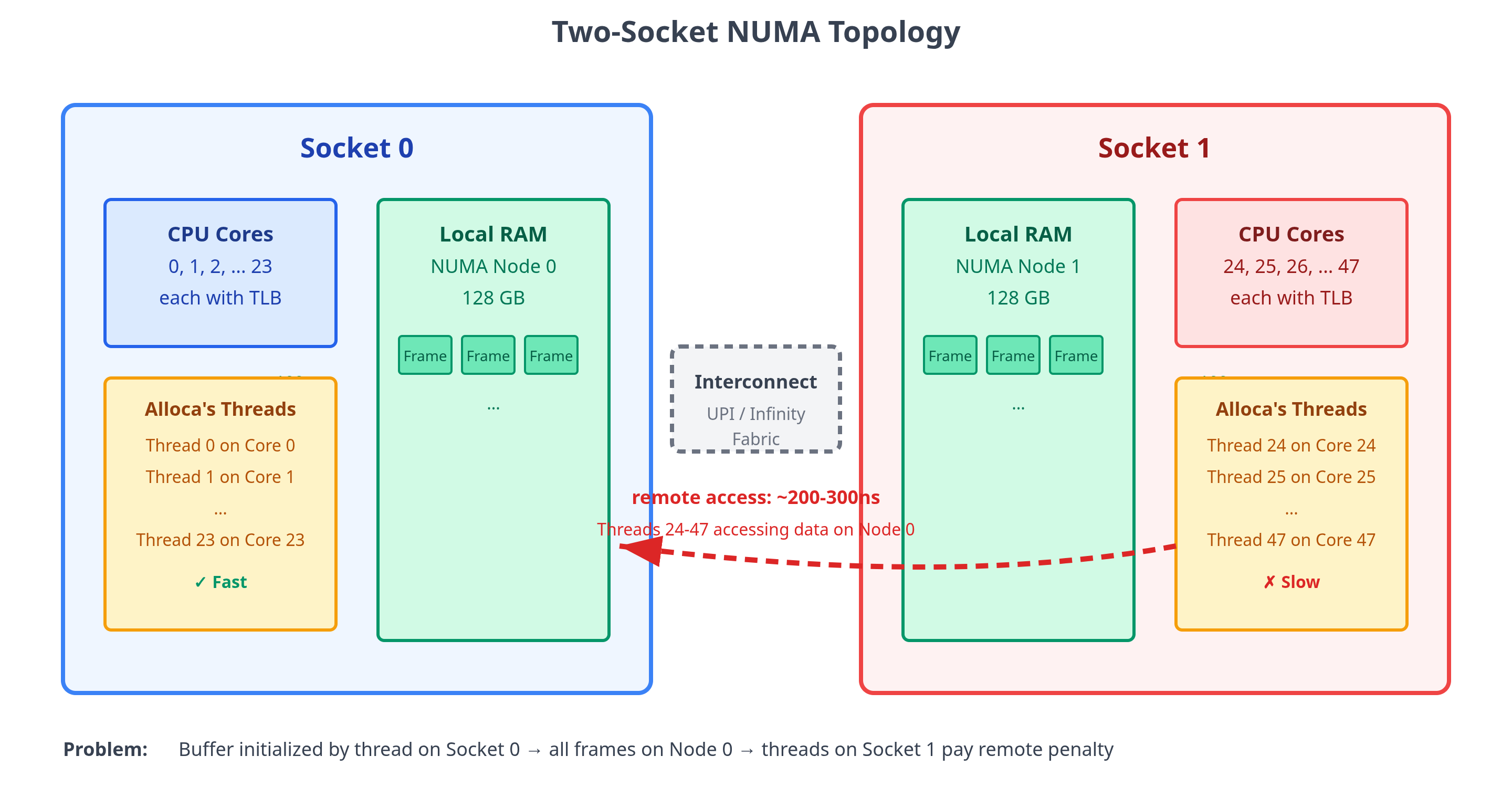
Kernel: “This server has two CPU sockets. Each socket has its own pool of RAM wired directly to it. When a CPU on socket 0 reads from memory attached to socket 0, it’s a short trip, maybe 100 nanoseconds. Fast.”
Alloca: “And what about reading from the other socket’s memory?”
Kernel: “That’s where the problem appears. Socket 0 and socket 1 are connected by an inter-socket link. When a CPU on socket 0 needs data from memory attached to socket 1, the request must cross that link. Round trip takes two to three times longer.”
Alloca: “But my virtual address space… it’s just a flat range of addresses. How would I even know which memory is on which socket?”
Kernel: “You don’t. That’s the problem. Your virtual addresses are completely abstract. Address
0x10000and address0x20000look identical to you. But behind the scenes, one might map to a physical frame on socket 0, and the other to a frame on socket 1. The virtual memory system hides that completely.”Alloca: “So the physical location of my data determines performance, but I have no control over it?”
Kernel: “You do have control, but it’s indirect. The key moment is when a page is first accessed. Remember demand paging? When you touch a page for the first time, I have to allocate a physical frame for it. At that moment, I need to decide which NUMA node to allocate from.”
Alloca: “How do you decide?”
Kernel: “By default, I use what’s called first-touch placement. Whichever CPU core triggers the page fault gets to decide. I allocate the frame from that core’s local NUMA node. So if your thread running on core 5 (which is on socket 0) is the first to touch a page, that page’s frame lands on socket 0’s memory pool.”
Alloca: “Okay, so the first thread to touch a page determines where it lives physically.”
Kernel: “Yes. Now think about what probably happened with your buffer. You likely had one thread, maybe your main thread that initialized the buffer. That thread touched every page in sequence, probably while running on socket 0. Every single page fault was handled by a CPU on socket 0, so every single frame landed on socket 0’s memory.”
Alloca: “And then I handed that buffer to all my worker threads?”
Kernel: “Right. And those threads are distributed across both sockets. Threads 0 through 23 run on socket 0, when they access the buffer, the memory is local, everything is fast. But threads 24 through 47 run on socket 1. Any cache miss they take resolves as a DRAM fetch, and that DRAM is on the wrong socket, the access has to cross the inter-socket interconnect. That’s typically two to three times the latency of a local DRAM fetch.”
Alloca: “That explains the performance split perfectly. So the thread that initializes the data and the threads that use it need to be on the same socket?”
Kernel: “That’s one solution. For partitioned data where each thread works on its own section, you can have each thread initialize its own portion while pinned to the socket where it’ll do the work. The first-touch policy ensures the data lands locally.”
Alloca: “What if the data is shared? All my threads are reading the same buffer.”
Kernel: “Then you have a harder problem. No matter where you put the data, it’s local for some threads and remote for others. One approach is to use explicit NUMA policies. The mbind system call lets you control allocation policy for a specific virtual address range.”
Alloca: “What can I do with it?”
Kernel: “Several things. You can bind a range to a specific NUMA node, force all its pages onto one socket’s memory. You can set a preferred node that’s tried first but allows fallback. Or you can interleave pages across nodes, where consecutive pages alternate between socket 0 and socket 1.”
Alloca: “Why would I want to interleave?”
Kernel: “Interleaving is useful for heavily shared data with high bandwidth demand. Think about it, if all your threads are hammering the same memory range, putting it all on one socket creates a bottleneck, all the traffic goes through one memory controller. With interleaving, each socket sees a mix of local and remote pages when scanning the range, but the bandwidth demand is spread across both memory controllers rather than concentrating on one. You’re trading some locality for better aggregate throughput.”
Alloca: “Understood. Is there also the possibility of the scheduler moving my threads between sockets after I’ve set everything up?”
Kernel: “Yes, in that case your careful placement falls apart. If a thread that was running on socket 0 with local memory gets migrated to socket 1, then suddenly all its memory is remote. This is why NUMA-sensitive workloads typically pin threads to specific CPUs using taskset or pthread_setaffinity_np.”
Alloca: “So the typical pattern is: decide which threads work on which data, pin those threads to the appropriate socket’s cores, and make sure the thread that first touches the data is running on the right socket so first-touch puts the frames locally.”
Kernel: “That’s the basic approach for thread-private or partitioned data. For shared data, you either accept that some accesses will be remote, or you interleave to balance the load. There’s no perfect solution when multiple sockets need heavy access to the same memory. You’re always trading off between locality and bandwidth distribution.”
Aside: Automatic NUMA balancing
Linux also provides automatic NUMA balancing, controlled via /proc/sys/kernel/numa_balancing. When enabled, the kernel periodically samples a task’s memory by temporarily unmapping pages, or marking them so that the next access triggers a NUMA hinting fault. The fault lets the kernel record which CPU or NUMA node is actually accessing it. Based on those faults, the kernel may migrate pages toward the node that uses them, or move tasks closer to their memory. This can improve placement without code changes, though the sampling faults and migrations add overhead and are not guaranteed to help every workload.
The downside is that it is reactive. It adapts after the fact rather than placing memory correctly from the start, and the sampling-induced faults add a small overhead. For workloads where latency consistency matters, deliberate placement with `mbind` and thread pinning is more reliable. For workloads where access patterns are hard to predict or partition, automatic balancing can be a reasonable hands-off alternative.
Key Takeaway
Modern multi-socket servers are NUMA (Non-Uniform Memory Access) systems. Physical memory is divided into NUMA nodes, each directly attached to one CPU socket. A CPU can access memory on any node, but local access is noticeably faster than remote access, which must traverse the inter-socket interconnect.
The virtual address space hides this topology completely: two adjacent virtual pages may be backed by physical frames on different NUMA nodes. The NUMA node of a physical frame is primarily determined at allocation time by the kernel’s memory policy.
The kernel’s default policy for anonymous memory is effectively first-touch: when a page is first faulted into a real physical frame, it is usually allocated from the NUMA node local to the CPU handling that fault. If initialization and hot access happen on different sockets, most DRAM accesses will pay remote latency.
Strategies for NUMA-aware operation:
Initialize on the accessing socket: for partitioned data, the thread that will perform the hot accesses should also touch pages first, placing frames on the local node.
Thread pinning: bind threads to specific CPUs with
tasksetorpthread_setaffinity_npto prevent cross-socket migration.mbind/set_mempolicy: per-range NUMA allocation policy in code.numactl: command-line wrapper to set NUMA policy for an entire process.
Interleaving: for heavily shared data accessed across sockets, interleaving pages across nodes distributes bandwidth demand across multiple memory controllers. Each socket sees a mix of local and remote pages, but no single memory controller becomes a bottleneck.
Automatic NUMA balancing: the kernel can be configured to sample memory access patterns at runtime and migrate pages or tasks toward the nodes that use them most (
/proc/sys/kernel/numa_balancing). It requires no code changes but is reactive rather than proactive, it adapts after observing bad placement rather than preventing it. For latency-sensitive workloads, deliberate placement is more reliable.
For shared data accessed heavily by multiple sockets, no placement is perfect: the trade-off is between locality, bandwidth balance, and sometimes deliberate replication.
For data-intensive workloads on multi-socket servers, NUMA is often the dominant source of unexplained memory latency once TLB and cache behavior have been addressed.
Observing Virtual Memory in Practice
Our journey through the virtual memory world with Alloca ends here. We have covered the machinery of the modern Linux kernel from first principles. For this final section, I will switch back to my normal voice and cover the observability and debugging tools that let you actually see what is happening in a running system.
Understanding the mechanisms is one thing; knowing where to look when something goes wrong is another. Memory problems tend to disguise themselves. A process using more memory than expected, a workload that fits in RAM but still feels sluggish, a system that gradually slows down under load — each of these points to a different layer of the VM stack. The tools below correspond to those layers. Work through them in order when you are unsure where the problem lives.
Step 1: What address ranges does the process have?
Before anything else, look at what the process has actually mapped. /proc/<pid>/maps lists every VMA: the virtual address range, the permissions (r, w, x, and p/s for private or shared), the offset into any backing file, and the file name if there is one. You can see the heap, the stack, the shared libraries, and any mmap regions all in one place.
This is the reservation view. It tells you what address ranges exist and what they are allowed to do, but says nothing about how much physical memory is actually backing them. A region that looks large here might have almost no physical pages behind it, demand paging means pages are only allocated on first touch. pmap -x <pid> presents the same information in a slightly more readable table format.
Step 2: How much physical memory is the process actually using?
smaps is maps extended with a full accounting breakdown for every VMA. It tells us “what is actually in RAM.” The key fields to understand:
Rss(Resident Set Size): how many kilobytes of that VMA are currently in physical RAM. Pages that have never been touched, clean file-backed pages that have been reclaimed, or anonymous pages that have been swapped out all contribute nothing here.Pss(Proportional Set Size): like Rss, but shared pages are divided proportionally among all processes that map them. If ten processes share a 4 KB library page, each is charged 0.4 KB.Private_Clean/Private_Dirty: pages private to this process that either still match their backing file (clean) or have been written to and diverged (dirty).Shared_Clean/Shared_Dirty: pages shared with other processes. Clean shared pages, like read-only library code, are cheap to reclaim. Dirty shared pages need to be cleaned first: file-backed ones require writeback to disk, while shmem/tmpfs dirty pages go to swap instead.AnonHugePages: how many bytes of this VMA are backed by transparent huge pages. If you want to verify that THP is actually working for a particular region, this is the field to check.
For the system-wide picture, /proc/meminfo is the companion. The fields worth checking are MemAvailable (the kernel’s estimate of how much can be freed without touching swap), Cached (page cache, most of which is reclaimable), Dirty and Writeback (pages queued for or actively being written back), AnonPages (anonymous pages currently in RAM), and the swap fields: SwapTotal, SwapFree.
Step 3: Is the process triggering disk I/O through page faults?
Page faults are the mechanism that connects virtual addresses to physical memory, and they come in two very different varieties.
Minor faults (ru_minflt via getrusage) are resolved without any disk I/O. They involve a kernel trap and some bookkeeping, but no waiting for storage. A large number of minor faults during startup is perfectly normal.
Major faults (ru_majflt via getrusage, or major-faults in perf stat) are a different story. These required actual disk I/O, either reading a cold file page from storage, or bringing a page back from swap. On spinning disks, a major fault can easily take several milliseconds; on NVMe it might be a few hundred microseconds. Either way, sustained major faults in a steady-state hot path are a warning sign. They usually point to swap pressure, uncached memory-mapped file I/O, or a working set that is competing with the rest of the system for physical memory.
To measure fault counts for a single run:
perf stat -e page-faults,major-faults ./your-programpage-faults counts total faults; minor faults are approximately the difference from major.
Step 4: Is the whole system under memory pressure?
Once you have the process-level picture, zoom out to see whether the kernel itself is struggling.
vmstat 1 samples every second. The columns to watch are si and so (swap-in and swap-out in KiB per second). Nonzero so means the kernel is writing pages to swap because reclaim pressure has reached anonymous memory. Nonzero si means pages are being faulted back in. Both together at the same time is the classic thrashing pattern. The b column counts tasks currently blocked on I/O, which includes swap I/O.
Pressure Stall Information (PSI) at /proc/pressure/memory gives a finer picture. It reports the fraction of time tasks spent stalled waiting for memory: some means at least one task was stalled; full means all non-idle tasks were stalled simultaneously, i.e., the system was making zero forward progress. A machine where the full metric is climbing steadily is one where memory has become a genuine bottleneck, not just busy, but actively blocking work from completing.
Step 5: Is translation itself the bottleneck?
TLB misses are almost entirely invisible to the kernel. The MMU handles them in hardware via page-table walks; the kernel only gets involved if the walk faults because the page isn’t present. To observe TLB behavior you have to go to the hardware performance counters, which perf exposes.
perf stat -e dTLB-load-misses,dTLB-store-misses,iTLB-load-misses ./your-programdTLB-load-misses and dTLB-store-misses count data TLB misses on loads and stores respectively. iTLB-load-misses tracks instruction TLB misses, which matters when the code footprint is large or when working with JIT-compiled code. Note that the event names vary by CPU generation; perf list | grep -i tlb shows what your machine exposes.
As we learned in the article, a high TLB miss count alone doesn’t tell you much, what matters is whether those misses are triggering expensive page-table walks. A miss that hits the second-level TLB is relatively cheap, but the one that requires a full hardware page walk is not. For the actual walk cost, look for events like dtlb_load_misses.walk_active on Intel processors, which counts cycles spent actively walking page tables.
High TLB miss rates combined with low major-fault counts (data is in RAM but translations are not cached) point to a working set that has outgrown the TLB hierarchy. The remedies are the ones covered earlier: huge pages to reduce the number of entries needed, or tighter data packing to reduce the number of distinct pages touched.
Step 6: Are some threads slower than others on identical work?
If some threads consistently take longer than others doing the same computation, and the disparity is stable rather than random, NUMA placement is the first thing to check.
numactl --hardware shows the machine’s NUMA topology: the number of nodes, memory per node, and the distance matrix between nodes. The distance matrix is a relative latency measure. This tells you the penalty being paid per remote access.
numastat -p <pid> shows where a process’s pages actually live. If the bulk of the pages are on node 0 but the threads doing the work are running on node 1, that is first-touch misalignment in practice. /proc/<pid>/numa_maps provides the same information per VMA, including which NUMA policy is in effect for each region and how many pages have landed on each node. It is verbose but precise when you need to understand why a specific mapping ended up where it did.
Putting it together
Virtual memory problems almost always start as a vague symptom. The right approach is to peel back layers in order rather than guessing:
Is memory actually being used, or just reserved? Compare VMA size in
mapsto Rss insmaps. Large reserved-but-not-resident regions are normal (lazy allocation). Unexpectedly large Rss is the real signal.Is the process responsible for that memory, or is it shared? Compare Rss to Pss. If Rss is large but Pss is small, you’re mostly mapping shared libraries or shared regions that other processes are also paying for.
Is the process triggering frequent disk I/O through page faults? Check major fault count via
perf statorgetrusage. Sustained major faults in a steady-state workload usually mean swap pressure, uncached mmap/file-backed I/O, or a working set that does not fit in available RAM or page cache.Is the system reclaiming memory aggressively? Check
vmstatfor swap-in/out activity and PSI for actual stall time. Highsi/sowith high PSIfullis a system in memory distress.Is translation overhead high even with data fully in RAM? Check TLB miss rates and page-walk cycles via
perf stat. High miss rates with low fault counts point to a working set that has outgrown the TLB, a case for huge pages or tighter data packing.Are some threads consistently slower than others on the same work? Check NUMA placement via
numastat -pand/proc/<pid>/numa_maps. Asymmetric slowness with equal work is a NUMA symptom, but confirm it against CPU placement, page placement, and other sources of per-core variation such as thermal throttling, IRQ affinity, or lock contention.
What We’ve Learned
In this article, we explored virtual memory through a dialogue between the kernel and a user-space process named Alloca. Along the way, we covered a lot of ground: address spaces, page tables, TLBs, demand paging, memory types, page reclaim, copy-on-write, mmap, huge pages, TLB shootdowns, NUMA, observability, and more.
Let’s end this article with a summary of everything that we learned.
Providing memory-level isolation is the foundational problem that virtual memory solves. Each process gets its own private set of virtual addresses, and the MMU enforces the boundaries between them. No process can directly read or write another’s memory.
Giving the address space structure is the next step. The virtual address space is divided into segments like code, data, heap, and stack, each with different permissions and growth behavior. Code is read-only and executable; the stack grows down on demand; the heap grows up through allocator requests.
Mapping every byte to a physical location is impractical. A flat table covering the full 128 TB user address space would itself consume 256 GB. The solution is fixed-size pages and frames with hierarchical page tables: memory is divided into 4 KB chunks, any frame can back any page, and the page table hierarchy only allocates levels for address ranges actually in use.
Walking four levels of page table on every memory access would be too slow. The TLB caches recent virtual-to-physical translations so that most accesses skip the walk entirely. Hit rate depends on access patterns and how tightly the working set fits within the number of TLB entries available.
Allocating physical frames at malloc time wastes memory. Demand paging defers the allocation: when a process reserves memory, the kernel records the promise in a VMA but does not assign physical frames. Frames are allocated only on first access, when a page fault fires.
Not all pages cost the same to evict. The kernel distinguishes anonymous memory (heap, stack, and MAP_ANONYMOUS regions), file-backed memory (executables, shared libraries, mmap’d files), and tmpfs-backed shared memory. Clean file-backed pages can be dropped immediately and reloaded from disk. Dirty file-backed pages must be written back first. Anonymous and tmpfs pages need swap space because there is no file to reload them from.
Physical memory fills up. Page reclaim is the kernel’s mechanism for freeing frames under pressure. It uses hardware-maintained accessed bits to estimate recency without trapping every access, reverse mappings (rmap) to find which page table entries point to a given frame, and active/inactive LRU lists to identify cold pages. The goal is to evict cold pages while keeping hot working sets in RAM. Evicting pages that will soon be needed again causes thrashing.
Copying all of a process’s memory on fork is too slow. Copy-on-write shares physical frames between parent and child after fork. Pages are only copied when one side actually writes to them, tracked with per-frame reference counts. This makes fork nearly instantaneous regardless of address space size.
File I/O through a user buffer requires an extra copy. mmap maps page cache frames directly into the process address space, allowing the process to read file data without a separate copy from kernel buffer to user buffer. Multiple processes mapping the same file share the same physical frames.
Random access patterns scatter across too many pages. Sequential access reuses a small sliding window of TLB entries and benefits from reused cached translations and hardware prefetching in the cache. Random access, such as hash table probes, and pointer chasing, does not have the same guarantees and can suffer from unpredictable performance.
Large working sets exhaust TLB capacity. Huge pages (2 MB or 1 GB on x86-64) can allow a single TLB entry to cover orders of magnitude more memory than a standard 4 KB page. The constraint is physical contiguity: huge pages require large, aligned, contiguous blocks of physical memory, which become harder to find as memory fragments over time.
Unmapping pages on a multi-core machine requires cross-core coordination. Each CPU core has its own TLB. When the kernel removes or changes a page table mapping, other cores may still hold the old translation cached. A TLB shootdown sends inter-processor interrupts to all relevant cores, forcing them to flush stale entries before the operation can complete. This is why munmap and mprotect on large regions can be expensive on machines with many cores.
Virtual memory hides the physical topology of memory. On multi-socket NUMA servers, physical memory is divided into nodes, each attached to one socket. Remote memory accesses (those that cross the inter-socket interconnect) are 1.5–3× slower than local ones. The virtual address space makes both look identical. Correct NUMA placement requires co-locating threads with their data and using first-touch initialization, thread pinning, or explicit mbind policies.
Very cool. I am also a big fan of the mini-book as pdf option.